Trigger Flows by Tag or Segment
What is that?
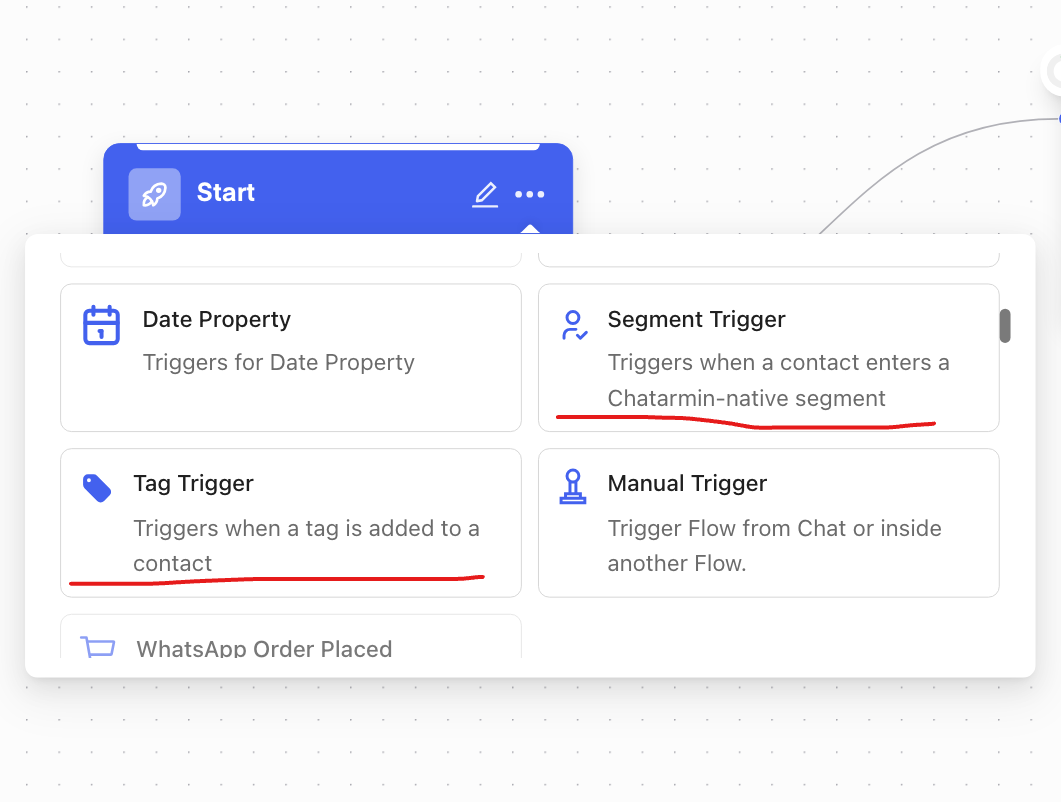
You can now automatically start a Chatarmin flow as soon as a contact is tagged with a specific tag (tag trigger) or enters a Chatarmin-specific segment (segment trigger). This allows you to reach exactly the right target audience at the right moment—without any manual effort.
Why This Is Important
Until now, you had to start flows manually or via other triggers (e.g., ticket status, POST API). With the Tag Trigger and Segment Trigger, you can now build directly on your existing tagging and segmentation—ideal for targeted re-engagement or nurturing without having to initiate anything manually.
⚙️ Here's how to set it up
Open the Flow Builder in Chatarmin.
Create a new flow and select either "Tag Trigger" or "Segment Trigger" as the trigger.
Tag Trigger: Select the tag that, when assigned to a contact, should start the flow.
Segment Trigger: Select the desired segment. Segments are synchronized every 10 minutes so that new members are automatically added to the flow.
Set up the desired message steps and activate the flow.
When to use this
Automatic re-engagement for a specific segment (e.g., “Passive Recipients”).
Targeted campaigns that are triggered as soon as a contact is assigned a specific tag (e.g., VIP, Prospect).
Addition to existing trigger types such as ArminCX ticket status or POST API.
When NOT to use this
For segments based on external API filters (e.g., Klaviyo, Emarsys for Shopify)—these are currently not supported for technical reasons to avoid rate-limiting issues.
For one-time, manual actions—use a different, appropriate trigger type instead.
🚨 Good to know: The Segment Trigger only works with segments based on Chatarmin's own filters (no external API call required). Segments are synchronized every 10 minutes; tags trigger the flow immediately upon assignment.
You're all set and ready to go!