
Set chatarmin.com for every entry point
- Open Meta Business Suite and go to the conversation routing settings of your WhatsApp number.
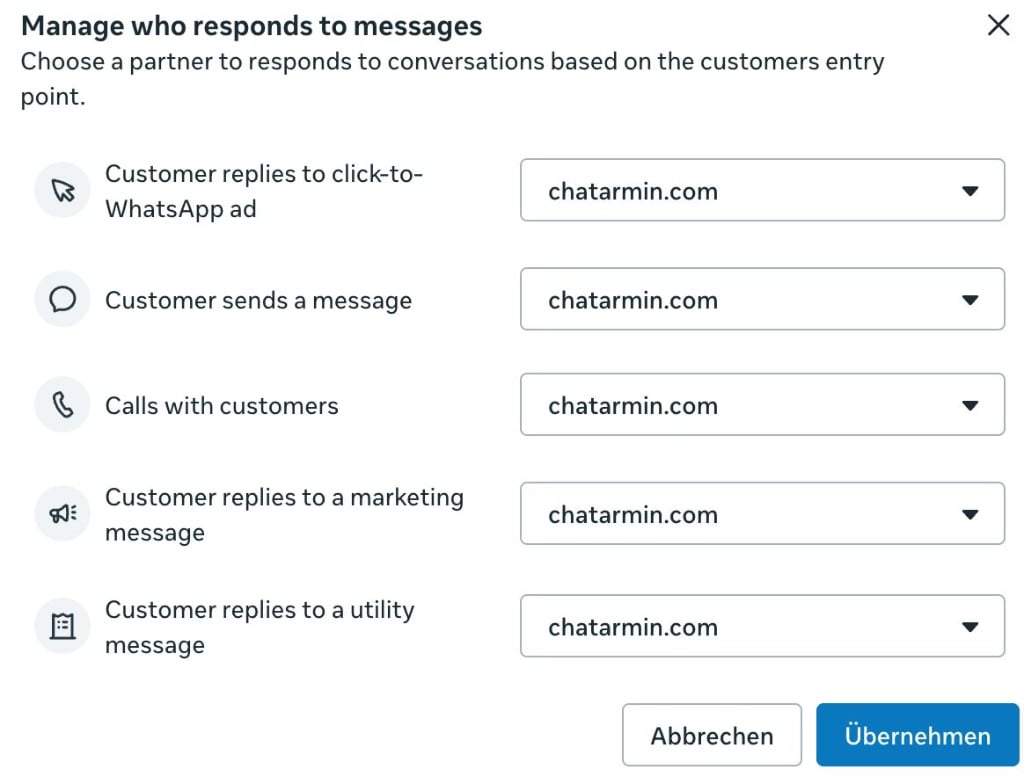
- In “Manage who responds to messages”, select chatarmin.com for every entry point:
- Customer replies to click-to-WhatsApp ad
- Customer sends a message
- Calls with customers
- Customer replies to a marketing message
- Customer replies to a utility message
- Click “Apply”.
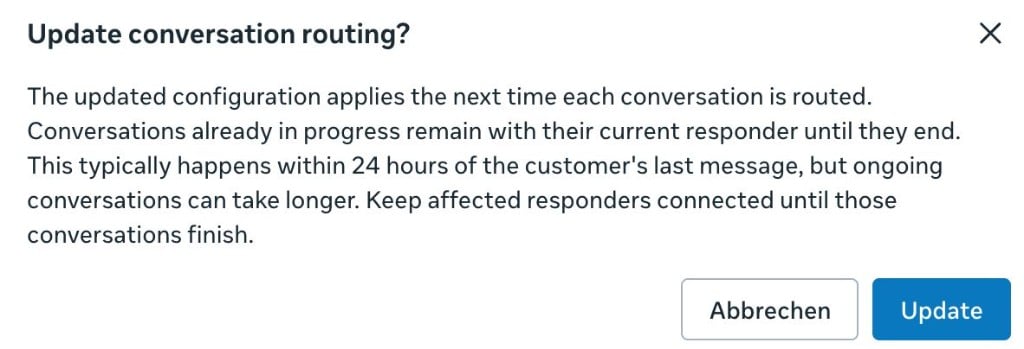
- Meta asks you to confirm the change. Click “Update”.
Conversations that are still running
The new setting applies the next time a conversation is routed. Conversations already in progress stay with the previous app until they end. This usually happens within 24 hours of the customer’s last message, but ongoing conversations can take longer.
Keep the previous app connected until those conversations are finished. Disconnect it afterwards so Chatarmin is the only responder on your number.

Signs that another app is still the responder
- New customer messages don’t show up in the Chatarmin inbox.
- Flows triggered by customer messages (keywords, welcome flows, AI replies) don’t start.
- A chat shows: “Another app connected to this WhatsApp number is handling this conversation.”
- Replies fail with Meta error
131070.