> ## Documentation Index
> Fetch the complete documentation index at: https://help.chatarmin.com/llms.txt
> Use this file to discover all available pages before exploring further.
# WhatsApp ads
> Chatarmin guide: WhatsApp ads
Here is how to setup your performance marketing funnels through a mobile-optimized WhatsApp-user-journey. Both for Meta and for Google, where ads-managers have dedicated WhatsApp-adsets as conversion-types.
## META
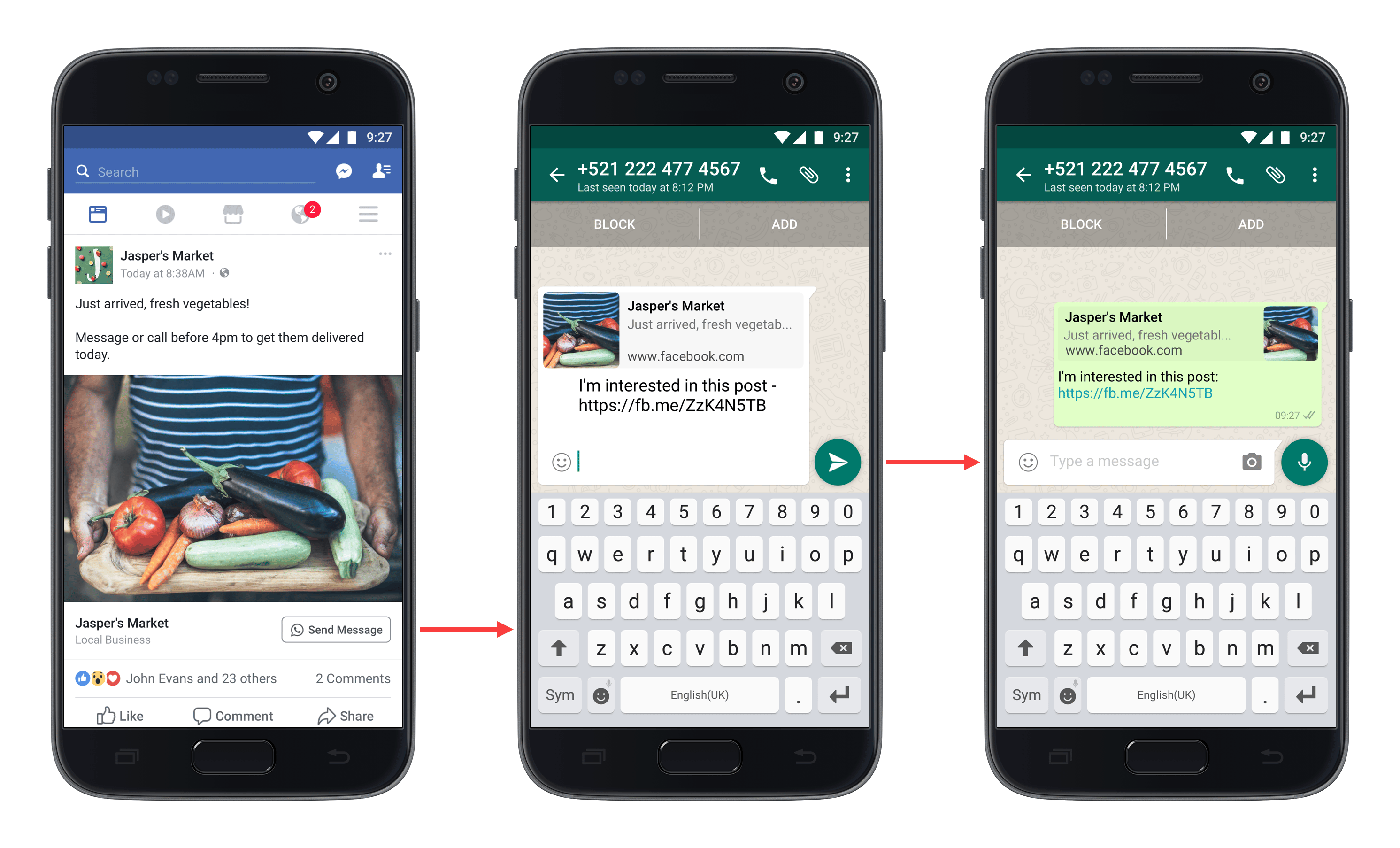 You can funnel your META ads into WhatsApp, this way you have **72 hours instead of your usual 24-hour window**. The advantage of this is again that a **WhatsApp lead has a CLTV of up to 200% of an E-Mail** lead and in the same step you can **collect the E-Mail** at the same time. To find an extensive deep dive into WhatsApp ads and how to set them up read our CEOs Johannes Mansbart's article and guide ["WhatsApp Ads: How WhatsApp Chatstart Ads work for new customer acquisition"](https://chatarmin.com/en/blog/whats-app-ads-how-whats-app-chatstart-ads-work).
Also, feel free to check out [Meta's official guide on Click-to-WhatsApp-ads](https://www.facebook.com/business/help/447934475640650?id=371525583593535).
🚨 ***PRO TIP 1: If you want to use our "Chatstart Link" with a Buzzword, you will need to create a Workaround in order to use them in Ads:***
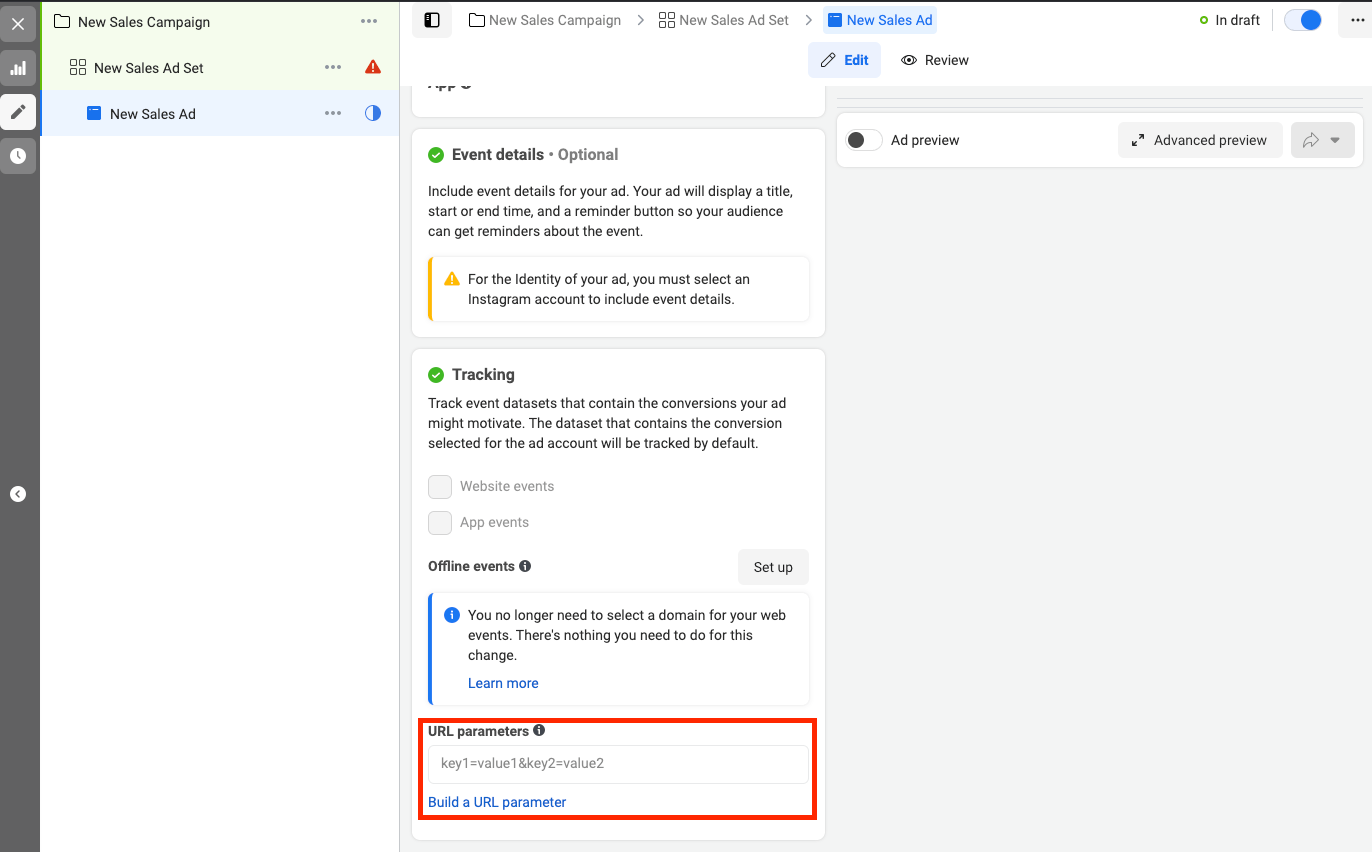
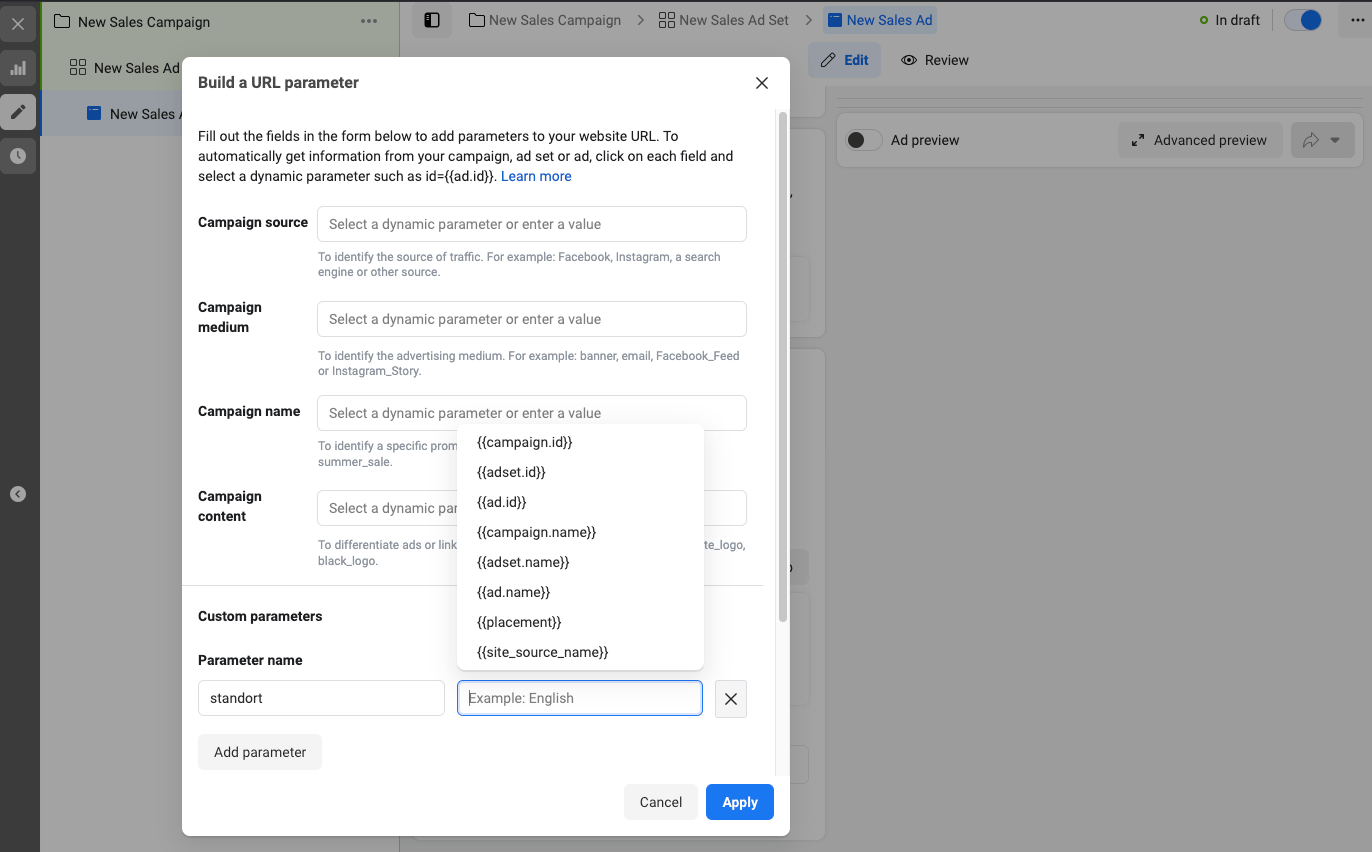
***🚨 PRO TIP 2: Sending variables ("Parameters") within the same adset works the following way:***
**Example Nissan with locations of hundreds of retailers in Germany:**
1. Create a Buzzword CTA with dynamic Variable. So a buzzword like: "Hi Nissan. Ich bin hier bei #\{\{standort}}"
2. This would resolve in a chatstart link like: [https://waurl.me/qskrlprd3?standort=XXXX](https://waurl.me/qskrlprd3?standort=XXXX)
3. This "standort" ("location") parameter can be filled in the ad dynamically through their Variables.
4. We can then use if/else in Flows to filter for that value
You can funnel your META ads into WhatsApp, this way you have **72 hours instead of your usual 24-hour window**. The advantage of this is again that a **WhatsApp lead has a CLTV of up to 200% of an E-Mail** lead and in the same step you can **collect the E-Mail** at the same time. To find an extensive deep dive into WhatsApp ads and how to set them up read our CEOs Johannes Mansbart's article and guide ["WhatsApp Ads: How WhatsApp Chatstart Ads work for new customer acquisition"](https://chatarmin.com/en/blog/whats-app-ads-how-whats-app-chatstart-ads-work).
Also, feel free to check out [Meta's official guide on Click-to-WhatsApp-ads](https://www.facebook.com/business/help/447934475640650?id=371525583593535).
🚨 ***PRO TIP 1: If you want to use our "Chatstart Link" with a Buzzword, you will need to create a Workaround in order to use them in Ads:***
***🚨 PRO TIP 2: Sending variables ("Parameters") within the same adset works the following way:***
**Example Nissan with locations of hundreds of retailers in Germany:**
1. Create a Buzzword CTA with dynamic Variable. So a buzzword like: "Hi Nissan. Ich bin hier bei #\{\{standort}}"
2. This would resolve in a chatstart link like: [https://waurl.me/qskrlprd3?standort=XXXX](https://waurl.me/qskrlprd3?standort=XXXX)
3. This "standort" ("location") parameter can be filled in the ad dynamically through their Variables.
4. We can then use if/else in Flows to filter for that value
 ***🚨 PRO TIP 1:*** Rather use a direct discount link such as [https://alpensattel.de/discount/wa10](https://alpensattel.de/discount/wa10) in order to save one step in the user journey and have your clients apply the whatsapp-discount-code directly without any additional input in checkout!
Here's a quick video explaining the Click-To-WhatsApp-Ads setup 🎬
*Source: Chatarmin, Q3 2024*
Send custom parameters from WhatsApp ads to Chatarmin:
*Source: Chatarmin, Q4, 2024*
🚨 ***WhatsApp-Ads FAQ***
*Q: I don't see a workaround for the problem that messaging apps Whatsapp are not accepted in Europe in my ad account?*
*A: The workaround is that you can't select "Messaging Apps". You have to select "Website". There's no other way. But it doesn't really make a difference.* I think it only works with leads and then looking at target content.
## GOOGLE
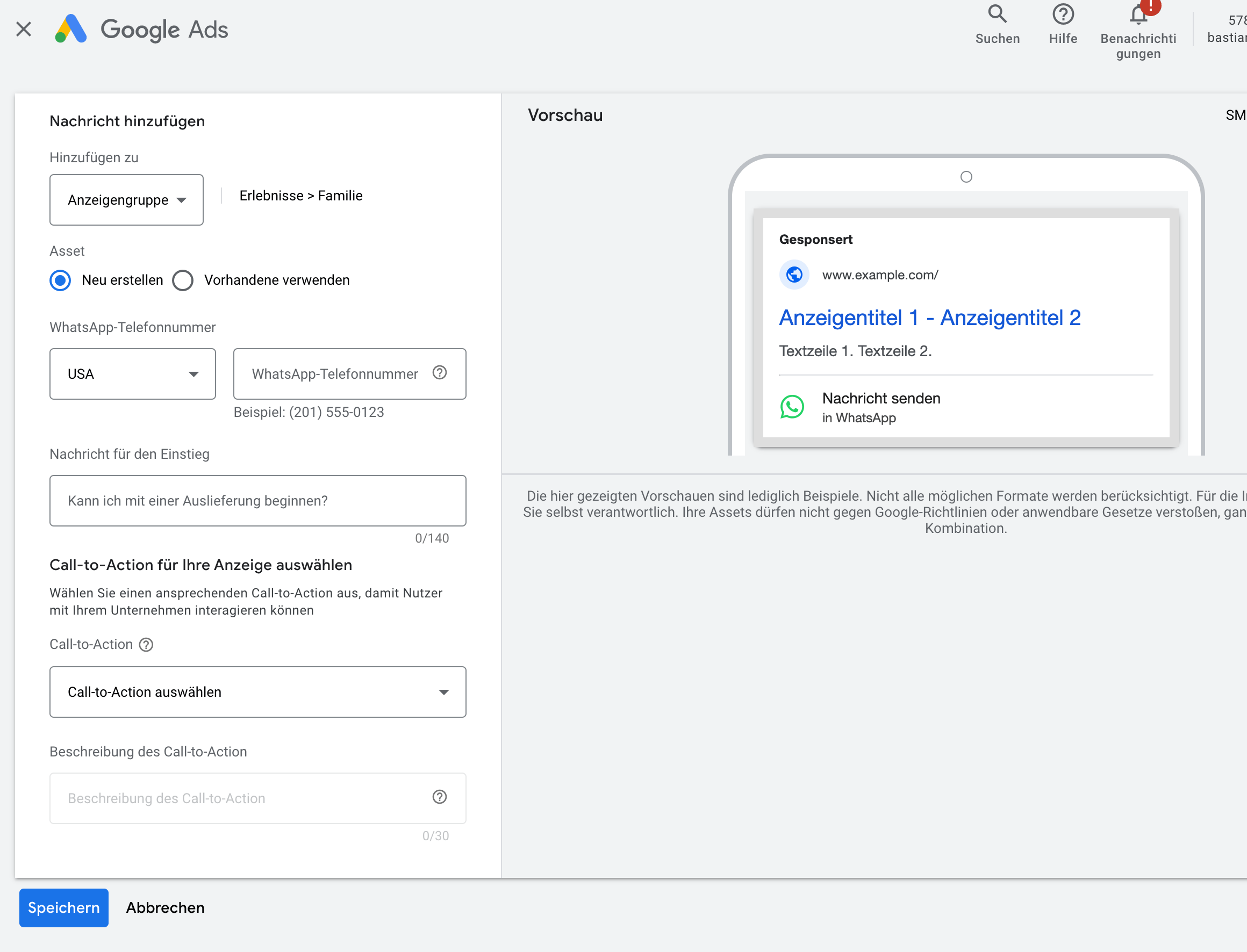
Google ads account extension: WhatsApp ads
***🚨 PRO TIP 1:*** Rather use a direct discount link such as [https://alpensattel.de/discount/wa10](https://alpensattel.de/discount/wa10) in order to save one step in the user journey and have your clients apply the whatsapp-discount-code directly without any additional input in checkout!
Here's a quick video explaining the Click-To-WhatsApp-Ads setup 🎬
*Source: Chatarmin, Q3 2024*
Send custom parameters from WhatsApp ads to Chatarmin:
*Source: Chatarmin, Q4, 2024*
🚨 ***WhatsApp-Ads FAQ***
*Q: I don't see a workaround for the problem that messaging apps Whatsapp are not accepted in Europe in my ad account?*
*A: The workaround is that you can't select "Messaging Apps". You have to select "Website". There's no other way. But it doesn't really make a difference.* I think it only works with leads and then looking at target content.
## GOOGLE
Google ads account extension: WhatsApp ads
 *source: RETITO, Q4 2024 (Bastian Tonn)*
Here is an explanation by our partner Bastian Tonn, video on Click-To-WhatsApp-Google ads 🎬
*source: RETITO, Q4 2024 (Bastian Tonn)*
*source: RETITO, Q4 2024 (Bastian Tonn)*
Here is an explanation by our partner Bastian Tonn, video on Click-To-WhatsApp-Google ads 🎬
*source: RETITO, Q4 2024 (Bastian Tonn)*