> ## Documentation Index
> Fetch the complete documentation index at: https://help.chatarmin.com/llms.txt
> Use this file to discover all available pages before exploring further.
# Import activation campaign
> Chatarmin guide: Import activation campaign
***Attention:*** this is an offensive and aggressive strategy to boost your WhatsApp-list-size, that should only be applied when
* Messaging Limit: your account messaging limit is high (10k+)
* Account Quality Rating: your account quality rating is high
* Proven Track Record: you have sustained WhatsApp-marketing successfully for 3+ months
If all that applies, you should be able to aim for the following KPI's:
* 50%+ opening rate
* 10%+ click through rate
* 10%+ activation rate
* 5%- unsubscribe rate
Make sure you activate in batches and use the historical highest-quality-leads, first.
Let's go:
**Import** your **existing phone numbers** from your **CRM** and create an **activation campaign**. You can **import your CSV** in the ["audience"](https://chatarmin.com/dashboard/audience) feature and tag them with a **tag**, e.g. **"Imported"**. Then create a [**"Template"**](https://chatarmin.com/dashboard/templates/add) that tells your clients you are now on WhatsApp and optionally tease them with an incentive such as a discount code. Include two buttons in the activation campaign, e.g. **"I want to join"** and **"No, thanks"**.
Then, include "I want to join" **as an additional buzzword into your existing Welcome Flow** or **create a new Opt-In** flow with a success message and **update opt-in Status**, include **"No, thanks"** as an **additional buzzword into your Opt-out Flow**.
You may have to create a Segment with **"didn´t receive the template "Opt-In"** if your number of imported contacts is larger than your current messaging limit.
This way, you can activate your previously gathered clients and re-activate ressources from within your organization, that are already there.
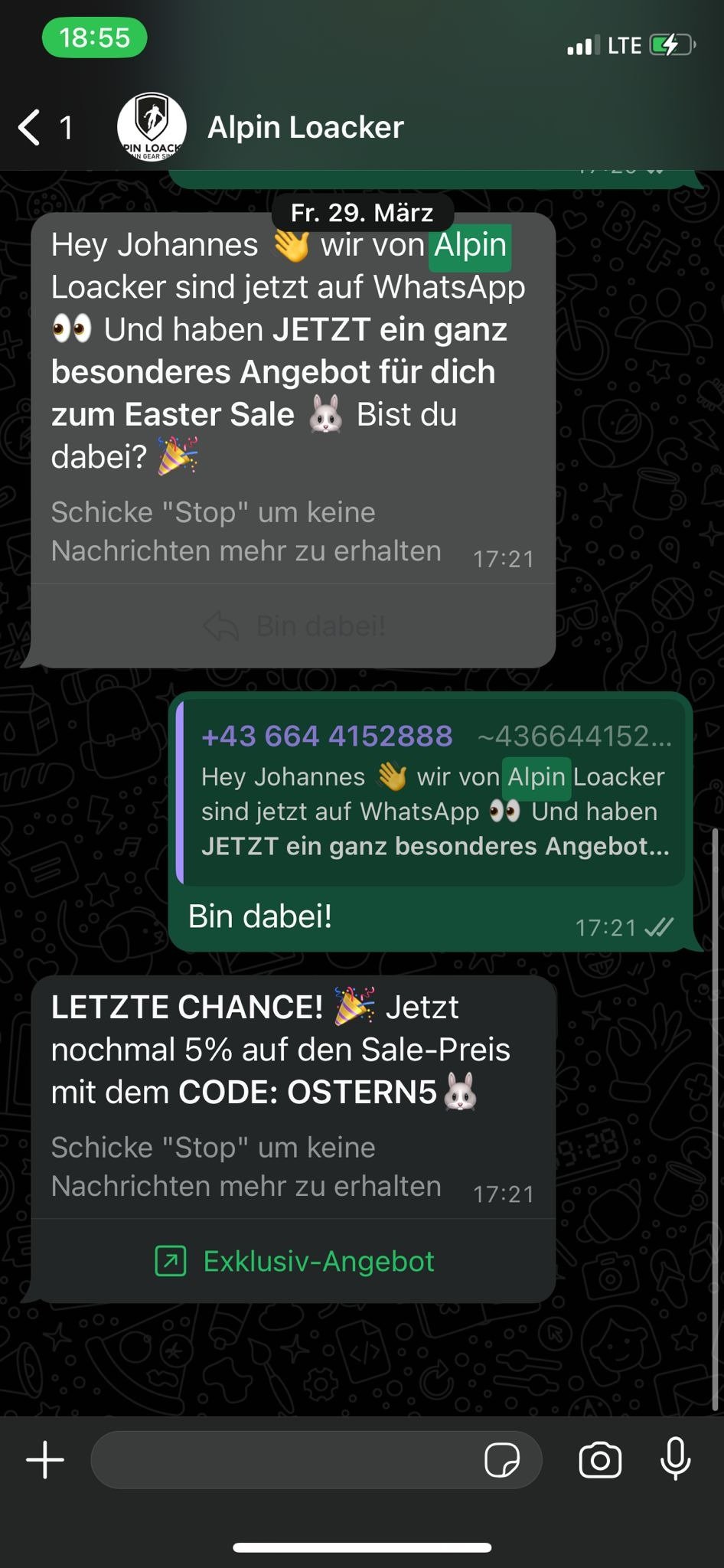 *Example of a WhatsApp-activation-campaign. Source: WhatsApp, 2024*
See our article ["How to set up your account from scratch"](/how-to-get-started/how-to-set-up-your-account-from-scratch) for a step-by-step guide or watch the following video:
*Activation Campaign Loom: Activate your existing client base with a WhatsApp-activation-campaign. Source: Chatarmin, 2024*
***🚨 PRO TIP:*** Rather use a direct discount link such as [https://alpensattel.de/discount/wa10](https://alpensattel.de/discount/wa10) in order to save one step in the user journey and have your clients apply the whatsapp-discount-code directly without any additional input in checkout!
\*\*\*🚨 PRO TIP 2:\*\*\*Make sure you carefully balance your imported leads and activation campaigns, with your quality rating and messaging limits! If in doubt, [book a support-call with our team here](https://chatarmin.com/a/support).
***🚨 Attention!*** Depending on
* the size of your list
* the recency of your leads
* the quality of (WhatsApp-)phone numbers
the **success of your activation campaign** will vary. Be aware this has direct impact on your WhatsApp Account Quality Rating, which you need to manage and balance to maintain a high quality rating.
*Example of a WhatsApp-activation-campaign. Source: WhatsApp, 2024*
See our article ["How to set up your account from scratch"](/how-to-get-started/how-to-set-up-your-account-from-scratch) for a step-by-step guide or watch the following video:
*Activation Campaign Loom: Activate your existing client base with a WhatsApp-activation-campaign. Source: Chatarmin, 2024*
***🚨 PRO TIP:*** Rather use a direct discount link such as [https://alpensattel.de/discount/wa10](https://alpensattel.de/discount/wa10) in order to save one step in the user journey and have your clients apply the whatsapp-discount-code directly without any additional input in checkout!
\*\*\*🚨 PRO TIP 2:\*\*\*Make sure you carefully balance your imported leads and activation campaigns, with your quality rating and messaging limits! If in doubt, [book a support-call with our team here](https://chatarmin.com/a/support).
***🚨 Attention!*** Depending on
* the size of your list
* the recency of your leads
* the quality of (WhatsApp-)phone numbers
the **success of your activation campaign** will vary. Be aware this has direct impact on your WhatsApp Account Quality Rating, which you need to manage and balance to maintain a high quality rating.