> ## Documentation Index
> Fetch the complete documentation index at: https://help.chatarmin.com/llms.txt
> Use this file to discover all available pages before exploring further.
# Conditional rendering of Variables in Messages & Campaigns
> Chatarmin guide: Conditional rendering of Variables in Messages & Campaigns
Welcome to the Template Engine Guide. This document will help you understand how to use our template engine for dynamic content generation. The template engine supports various conditional statements and loops to customize your templates effectively.
# Where can this be used?
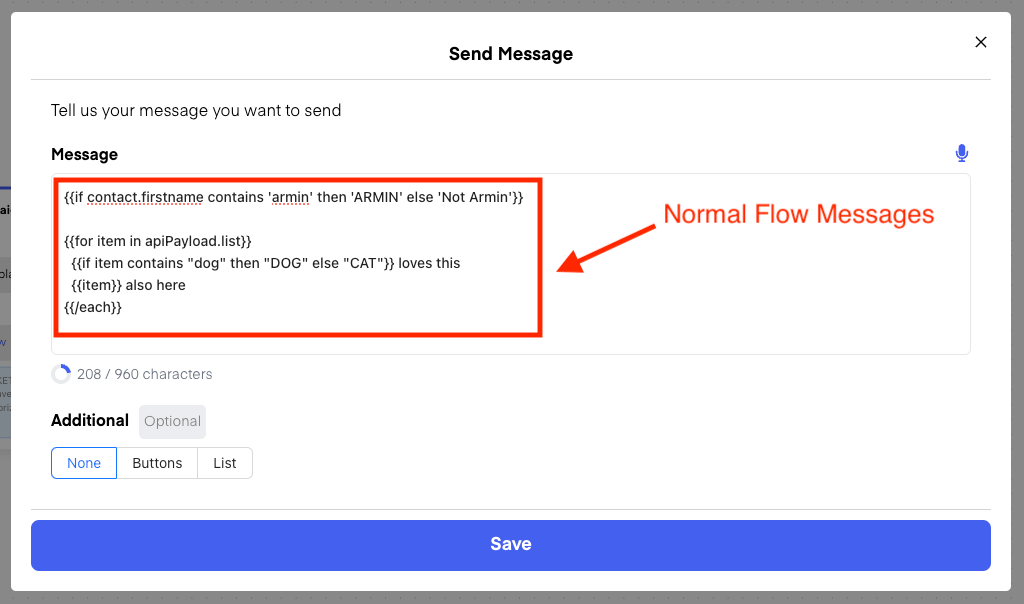
**In Flow Messages:**
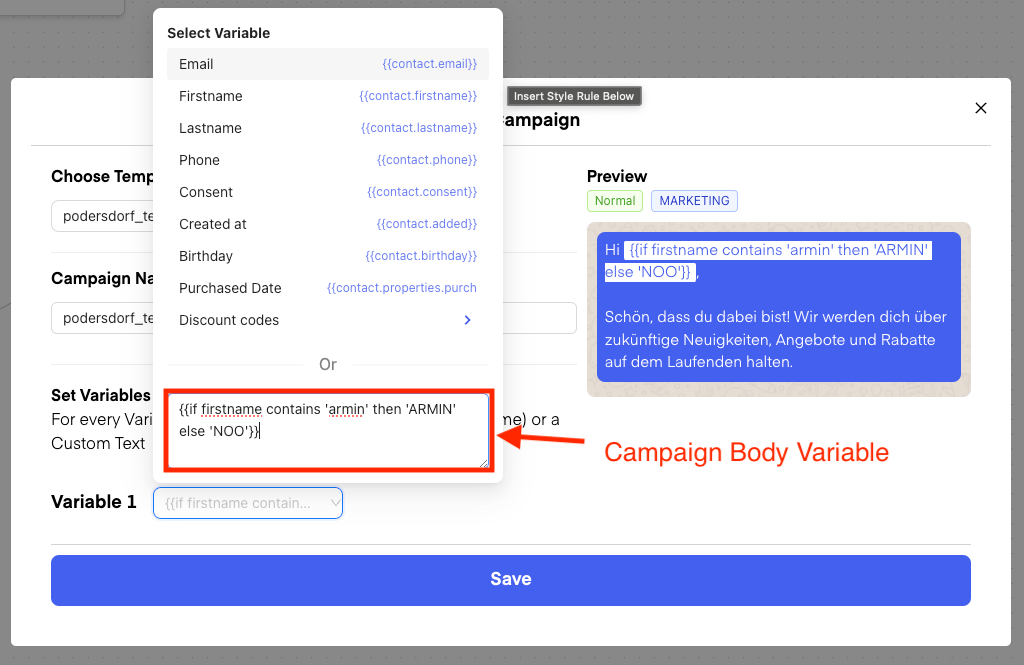
 **In Campaigns/Templates:**
 # Syntax
Currently, there are two options to make use of conditional rendering:
* If/Else rendering
* For loop / List rendering
## If/Else rendering
The syntax for this looks like so:
```
#{{if contact.firstname contains 'dog' then 'Doglover' else 'Catlover'}}
```
So the structure would be: **if \ \ then '\' else '\'**
### Different types of Conditions:
1. **contains:**\
Example:`#{{if contact.firstname contains 'dog' then 'Doglover' else 'Catlover'}}`
2. **isTrue:**\
Example:`#{{if contact.dog isTrue then 'Doglover' else 'Catlover'}}`
3. **isEmpty**: e.g.\
Example: `#{{if apiPayload.food isEmpty then 'No Food' else 'Still food'}}`
4. **equals**:\
Example: `#{{if contact.pet equals 'dog' then 'DOG' else 'CAT'}}`
## For loop / List rendering
Here, the syntax look like so:
```
#{{for item in contact.properties.items}}
#{{/each}}
```
Here, I could for example also combine the above if/else inside the For Loop:
```
#{{for item in contact.properties.items}}
#{{if item contains 'dog' then 'Doglover' else 'Catlover'}}
#{{/each}}
```
## Accessing Variables
When setting Variables through the Dropdown in Campaigns:
# Syntax
Currently, there are two options to make use of conditional rendering:
* If/Else rendering
* For loop / List rendering
## If/Else rendering
The syntax for this looks like so:
```
#{{if contact.firstname contains 'dog' then 'Doglover' else 'Catlover'}}
```
So the structure would be: **if \ \ then '\' else '\'**
### Different types of Conditions:
1. **contains:**\
Example:`#{{if contact.firstname contains 'dog' then 'Doglover' else 'Catlover'}}`
2. **isTrue:**\
Example:`#{{if contact.dog isTrue then 'Doglover' else 'Catlover'}}`
3. **isEmpty**: e.g.\
Example: `#{{if apiPayload.food isEmpty then 'No Food' else 'Still food'}}`
4. **equals**:\
Example: `#{{if contact.pet equals 'dog' then 'DOG' else 'CAT'}}`
## For loop / List rendering
Here, the syntax look like so:
```
#{{for item in contact.properties.items}}
#{{/each}}
```
Here, I could for example also combine the above if/else inside the For Loop:
```
#{{for item in contact.properties.items}}
#{{if item contains 'dog' then 'Doglover' else 'Catlover'}}
#{{/each}}
```
## Accessing Variables
When setting Variables through the Dropdown in Campaigns:
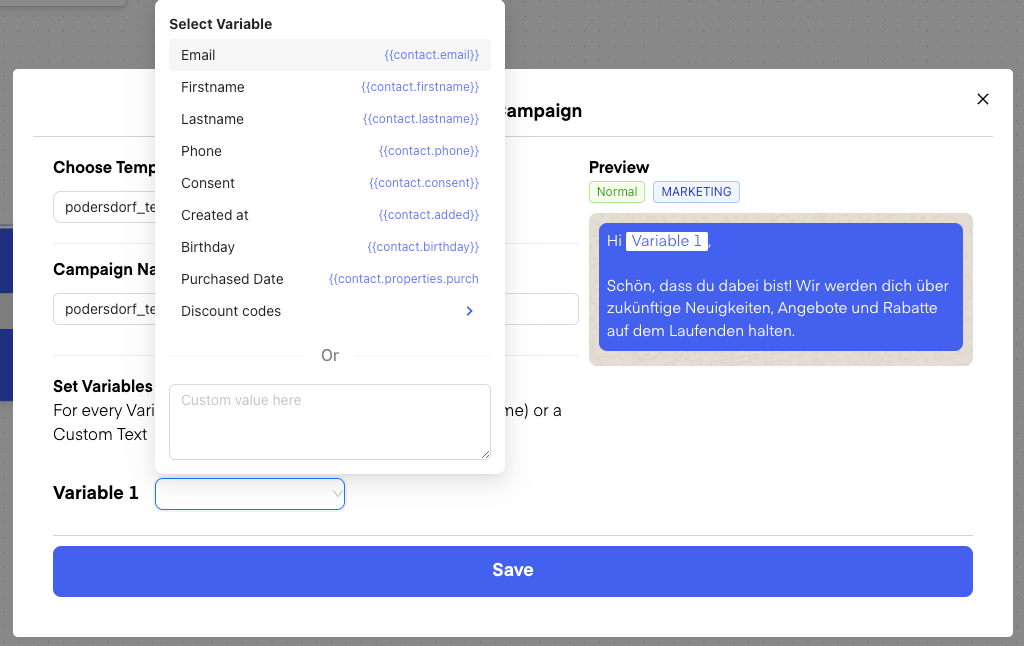 You can see, how you can access which exact properties.
In "normal Messages" of a Flow, you can see them, when you type in "@" in the Textinput:
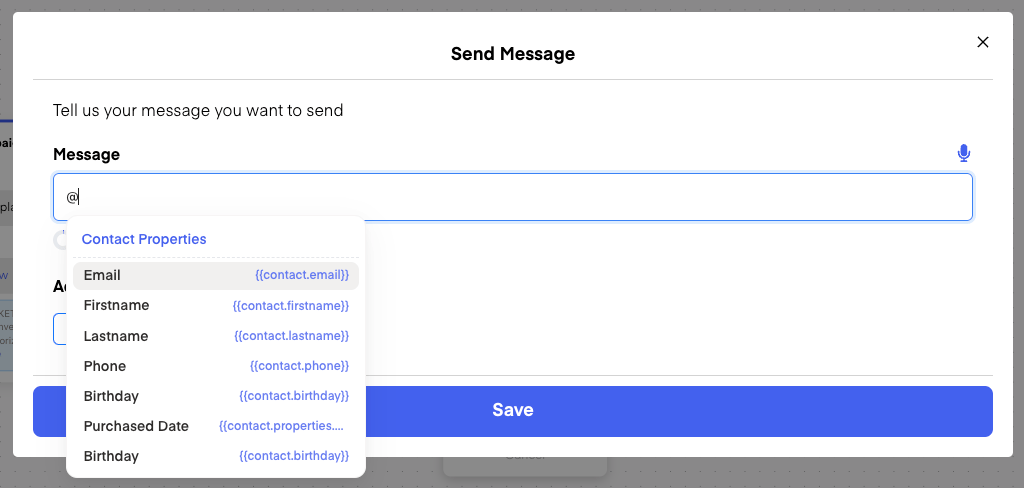
You can see, how you can access which exact properties.
In "normal Messages" of a Flow, you can see them, when you type in "@" in the Textinput:
 # Examples
Here are some examples and their outputs so you can get a bit of a feeling:
### Example 1
```
TEXT:
#{{for item in contact.properties.items}}
#{{item.quantity}} x #{{item.price}}
#{{/each}}
```
```
WHEN:
contact.properties.items => [{quantity:2, price: "50€"}]
OUTPUT:
2 x 50€
```
### Example 2
```
TEXT:
#{{if item contains 'dog' then 'Doglover' else 'Catlover'}}
```
```
WHEN:
item => "cats"
OUTPUT:
Catlover
```
### Example 3
You can also use nested/multiple if/else:
```
#{{if contact.isActive isTrue then "Active" else #{{if contact.firstname contains 'cat' then 'CAT Lover' else 'Inactive'}}}}
```
# Examples
Here are some examples and their outputs so you can get a bit of a feeling:
### Example 1
```
TEXT:
#{{for item in contact.properties.items}}
#{{item.quantity}} x #{{item.price}}
#{{/each}}
```
```
WHEN:
contact.properties.items => [{quantity:2, price: "50€"}]
OUTPUT:
2 x 50€
```
### Example 2
```
TEXT:
#{{if item contains 'dog' then 'Doglover' else 'Catlover'}}
```
```
WHEN:
item => "cats"
OUTPUT:
Catlover
```
### Example 3
You can also use nested/multiple if/else:
```
#{{if contact.isActive isTrue then "Active" else #{{if contact.firstname contains 'cat' then 'CAT Lover' else 'Inactive'}}}}
```