> ## Documentation Index
> Fetch the complete documentation index at: https://help.chatarmin.com/llms.txt
> Use this file to discover all available pages before exploring further.
# Messaging limit & Quality Rating - What they are and how to increase them
> Chatarmin guide: Messaging limit & Quality Rating - What they are and how to increase them
***
# Messaging Limits
***
Messaging limits are the maximum number of business-initiated conversations (conversations opened as a result of sending a marketing, utility, or authentication template to a WhatsApp user) a business phone number can open in a 24-hour moving period.
Business phone numbers are initially limited to 250 business-initiated conversations in a 24-hour moving period, but this limit can be [increased](https://developers.facebook.com/docs/whatsapp/messaging-limits/#increasing-your-limit) to 1K or more.
 ***
# Increasing Your Limit
***
If your business phone number has a [connected status](https://developers.facebook.com/docs/whatsapp/cloud-api/phone-numbers#phone-number-status), you can increase its messaging limit by either completing [business verification](https://developers.facebook.com/docs/whatsapp/overview/business-accounts/#business-verification), or opening 1,000 or more business-initiated conversations in a 30-day moving period, using templates with a high-quality [rating](https://developers.facebook.com/docs/whatsapp/messaging-limits/#quality-rating).
Messaging limits can be increased to the following limits:
* 1K business-initiated conversations
* 10K business-initiated conversations
* 100K business-initiated conversations
* An unlimited number of business-initiated conversations
***
# Increasing Your Limit
***
If your business phone number has a [connected status](https://developers.facebook.com/docs/whatsapp/cloud-api/phone-numbers#phone-number-status), you can increase its messaging limit by either completing [business verification](https://developers.facebook.com/docs/whatsapp/overview/business-accounts/#business-verification), or opening 1,000 or more business-initiated conversations in a 30-day moving period, using templates with a high-quality [rating](https://developers.facebook.com/docs/whatsapp/messaging-limits/#quality-rating).
Messaging limits can be increased to the following limits:
* 1K business-initiated conversations
* 10K business-initiated conversations
* 100K business-initiated conversations
* An unlimited number of business-initiated conversations
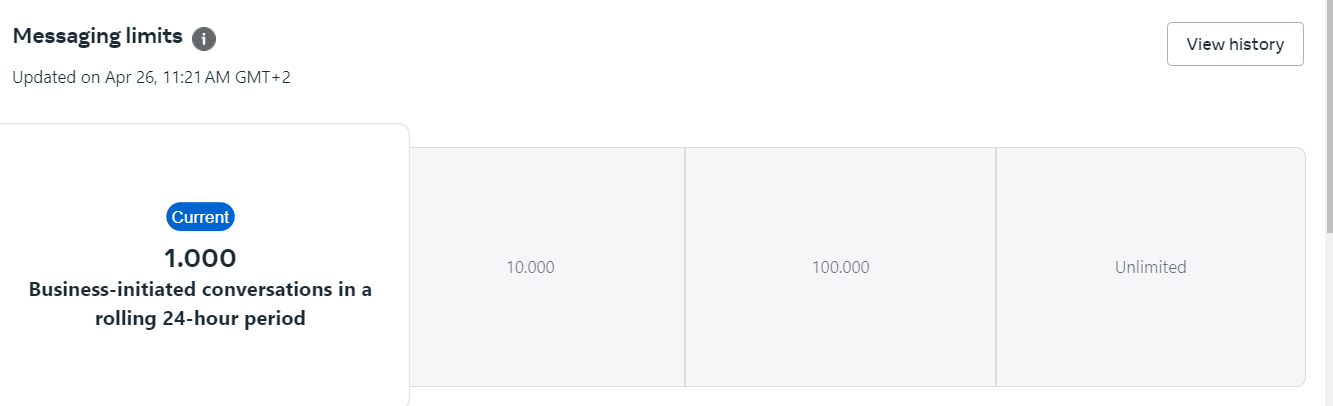 Once you complete business verification or meet the messaging threshold, your business phone number's messaging limit will be increased to 1K and can [scale automatically](https://developers.facebook.com/docs/whatsapp/messaging-limits/#automatic-scaling) after that.
Note that if your business phone number has a low-quality rating, it may continue to be limited to 250 business-initiated conversations until its quality rating improves.
***
# Automatic Scaling
***
Once you have reached the 1K business-initiated conversations limit, each time you open a business-initiated conversation, we will determine if your limit should be increased according to the following criteria:
* your business phone number is [connected](https://developers.facebook.com/docs/whatsapp/cloud-api/phone-numbers#phone-number-status)
* your business phone number [quality rating](https://developers.facebook.com/docs/whatsapp/messaging-limits/#quality-rating) is **Medium** or **High**
* in the last 7 days, your business phone number has been used to open X or more business-initiated conversations, where X is the business phone number's current messaging limit, divided by 2
If your business phone number meets all conditions, we will increase its limit by one level, 24 hours later. If its quality rating has been set to **Flagged** for the last 7 days, however, we will decrease its limit by one level, immediately.
***
## Checking Your Limit
You can check your current messaging limits in the [**WhatsApp Manager**](https://business.facebook.com/wa/manage/home/) > **Account tools** > **Insights** panel. The panel only shows your current limit if it has increased from the default.
Once you complete business verification or meet the messaging threshold, your business phone number's messaging limit will be increased to 1K and can [scale automatically](https://developers.facebook.com/docs/whatsapp/messaging-limits/#automatic-scaling) after that.
Note that if your business phone number has a low-quality rating, it may continue to be limited to 250 business-initiated conversations until its quality rating improves.
***
# Automatic Scaling
***
Once you have reached the 1K business-initiated conversations limit, each time you open a business-initiated conversation, we will determine if your limit should be increased according to the following criteria:
* your business phone number is [connected](https://developers.facebook.com/docs/whatsapp/cloud-api/phone-numbers#phone-number-status)
* your business phone number [quality rating](https://developers.facebook.com/docs/whatsapp/messaging-limits/#quality-rating) is **Medium** or **High**
* in the last 7 days, your business phone number has been used to open X or more business-initiated conversations, where X is the business phone number's current messaging limit, divided by 2
If your business phone number meets all conditions, we will increase its limit by one level, 24 hours later. If its quality rating has been set to **Flagged** for the last 7 days, however, we will decrease its limit by one level, immediately.
***
## Checking Your Limit
You can check your current messaging limits in the [**WhatsApp Manager**](https://business.facebook.com/wa/manage/home/) > **Account tools** > **Insights** panel. The panel only shows your current limit if it has increased from the default.
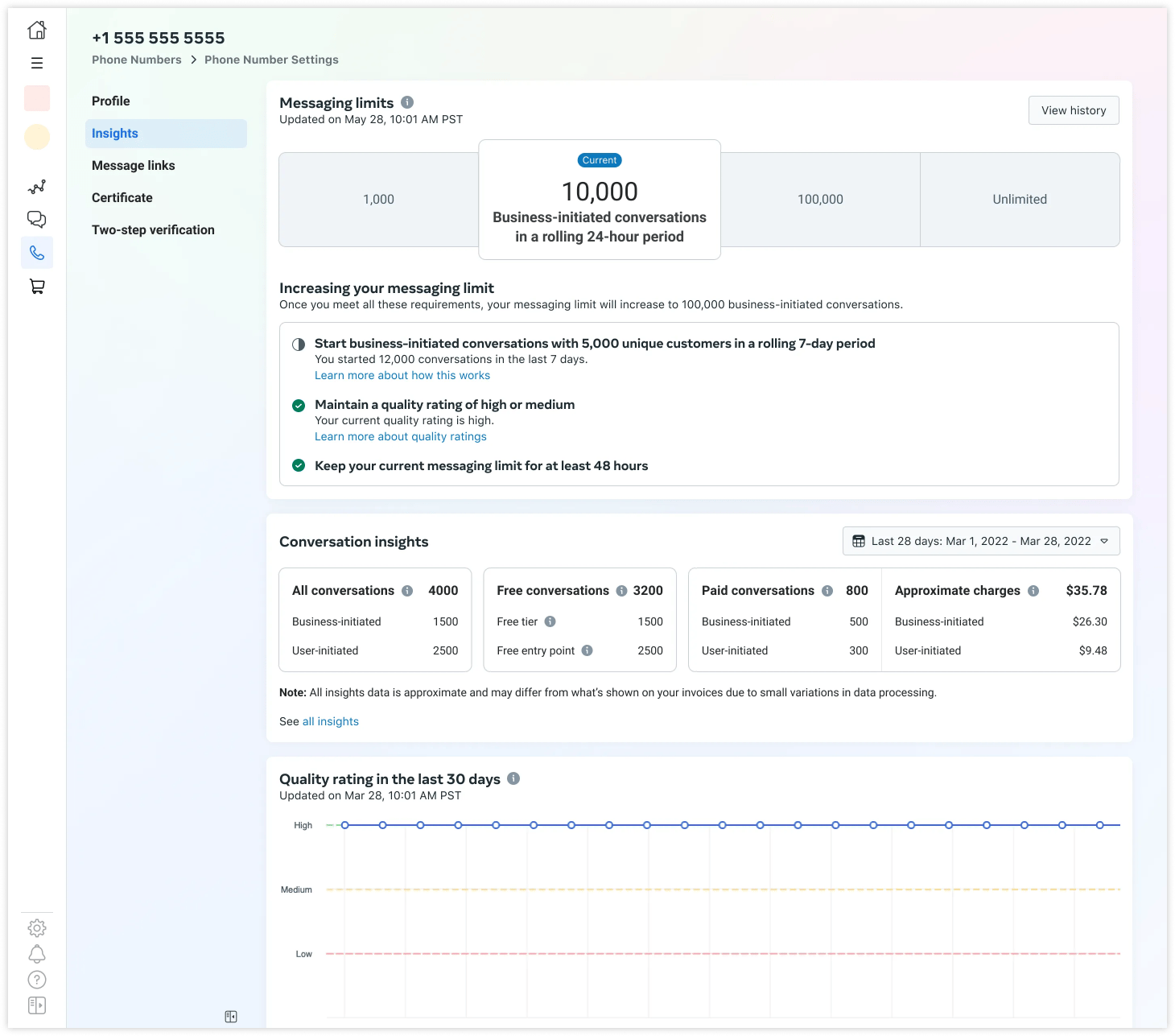 Your quality rating is based on how messages have been received by recipients over the past seven days and is weighted by recency. It is determined by a combination of quality signals from conversations between businesses and users. Examples include user feedback signals like blocks, reports and the reasons users provide when they block a business.
Your business phone number's status, quality rating, and messaging limits are displayed in the [**WhatsApp Manager**](https://business.facebook.com/wa/manage/home/) > **Account tools** > **Phone numbers** panel.
Note that it is normal for numbers with high traffic to experience quality changes within short intervals (even within minutes).
See [About WhatsApp Business Account Message Quality Rating](https://www.facebook.com/business/help/896873687365001) for more information about quality ratings.
***
# How to maintain high quality?
***
* Check your WhatsApp Business Account Quality Rating [here in your WhatsApp Manager](https://business.facebook.com/wa/manage/phone-numbers/) within the Meta Business Portfolio\
(ex "Business Suite" ex "FB Business Manager")
* Make sure messages follow the [WhatsApp Business Policy](https://l.facebook.com/l.php?u=https%3A%2F%2Fbusiness.whatsapp.com%2Fpolicy%3Ffbclid%3DIwAR2toFKMNbK97YGD56XJBBM5TmjFbXHQpuqEC-At2ZhwzeoOv3sTdXW4OLs\&h=AT0zgI_JzC1uKagbeYfxA13jFFyR_2w5bxdllOvbOApJtb9WN44s5g0ZSTUorltfc8D61qit0X7_-hWnoCyJtI5geoCrOd6wcmwQx1T8nTz9Mr5HwePtdd_GAzKc1KxSTkUIjw) and [Commerce Policy](https://business.whatsapp.com/policy?fbclid=IwAR0ODTBPgSM34yyvFNLU-g4uooMRx2QoIvpnTaJpNizjFtyArKm8fRcZoII).
* Only send messages to users who have opted into receiving messages from your business.
* Make the messages highly personalized and useful to users. Avoid sending open-ended welcome or introductory messages.
* Be mindful of messaging frequency; avoid sending customers too many messages a day. Be thoughtful of informational messages, optimizing for content and length.
***
# Campaign Send Limits Q\&A
***
**How many messages can be sent per minute?**
* Default 70/second -> On special request at META (this requires the [Blue Tick](/meta-related/whatsapp-official-business-account-blue-checkmark-verification) + highest [level of the messaging limit](/meta-related/messaging-limit-and-quality-rating-what-they-are-and-how-to-increase-them)) also 300/second
**How early do we need to schedule a campaign if we want to send a campaign to 50k people, for example?**
* *Update 032024*: From 1 to 50,000 it takes about 25 minutes. We are currently optimizing to get it to 15 minutes.
**Once a campaign has been set up, can it still be canceled? How quickly can this be done?**
* Exactly, until the campaign starts. But you can also pause it if it is already being sent
**Do I also have a security mode when customers report the campaign so that the sending is canceled?**
* Basically, META does this directly, so they pause the campaign/template if there is negative feedback, that's how it is with us too, yes.
Your quality rating is based on how messages have been received by recipients over the past seven days and is weighted by recency. It is determined by a combination of quality signals from conversations between businesses and users. Examples include user feedback signals like blocks, reports and the reasons users provide when they block a business.
Your business phone number's status, quality rating, and messaging limits are displayed in the [**WhatsApp Manager**](https://business.facebook.com/wa/manage/home/) > **Account tools** > **Phone numbers** panel.
Note that it is normal for numbers with high traffic to experience quality changes within short intervals (even within minutes).
See [About WhatsApp Business Account Message Quality Rating](https://www.facebook.com/business/help/896873687365001) for more information about quality ratings.
***
# How to maintain high quality?
***
* Check your WhatsApp Business Account Quality Rating [here in your WhatsApp Manager](https://business.facebook.com/wa/manage/phone-numbers/) within the Meta Business Portfolio\
(ex "Business Suite" ex "FB Business Manager")
* Make sure messages follow the [WhatsApp Business Policy](https://l.facebook.com/l.php?u=https%3A%2F%2Fbusiness.whatsapp.com%2Fpolicy%3Ffbclid%3DIwAR2toFKMNbK97YGD56XJBBM5TmjFbXHQpuqEC-At2ZhwzeoOv3sTdXW4OLs\&h=AT0zgI_JzC1uKagbeYfxA13jFFyR_2w5bxdllOvbOApJtb9WN44s5g0ZSTUorltfc8D61qit0X7_-hWnoCyJtI5geoCrOd6wcmwQx1T8nTz9Mr5HwePtdd_GAzKc1KxSTkUIjw) and [Commerce Policy](https://business.whatsapp.com/policy?fbclid=IwAR0ODTBPgSM34yyvFNLU-g4uooMRx2QoIvpnTaJpNizjFtyArKm8fRcZoII).
* Only send messages to users who have opted into receiving messages from your business.
* Make the messages highly personalized and useful to users. Avoid sending open-ended welcome or introductory messages.
* Be mindful of messaging frequency; avoid sending customers too many messages a day. Be thoughtful of informational messages, optimizing for content and length.
***
# Campaign Send Limits Q\&A
***
**How many messages can be sent per minute?**
* Default 70/second -> On special request at META (this requires the [Blue Tick](/meta-related/whatsapp-official-business-account-blue-checkmark-verification) + highest [level of the messaging limit](/meta-related/messaging-limit-and-quality-rating-what-they-are-and-how-to-increase-them)) also 300/second
**How early do we need to schedule a campaign if we want to send a campaign to 50k people, for example?**
* *Update 032024*: From 1 to 50,000 it takes about 25 minutes. We are currently optimizing to get it to 15 minutes.
**Once a campaign has been set up, can it still be canceled? How quickly can this be done?**
* Exactly, until the campaign starts. But you can also pause it if it is already being sent
**Do I also have a security mode when customers report the campaign so that the sending is canceled?**
* Basically, META does this directly, so they pause the campaign/template if there is negative feedback, that's how it is with us too, yes.