> ## Documentation Index
> Fetch the complete documentation index at: https://help.chatarmin.com/llms.txt
> Use this file to discover all available pages before exploring further.
# Shopify UI Extension - Thank You Page Widget (Shipment Tracking)
> Chatarmin guide: Shopify UI Extension - Thank You Page Widget (Shipment Tracking)
# 🚨 Prerequisites
To use the new Shopify UI Extensions, please make sure to first have the Shopify App installed. The precondition for that is, being live on the [updated Shopify Extension](https://help.shopify.com/de/manual/checkout-settings/customize-checkout-configurations/checkout-extensibility). Watch the [Guide](https://help.chatarmin.com/en/articles/175085-install-new-shopify-app) here.
**🚨 If you speak german, make sure to check out our YouTube Video Guide down below, otherwise just follow the article below:**
# How To Guide
Please watch the Video guide below:
## 🌐 Multilanguage Option
If you're using the multilanguage option, make sure to **activate the Multi-Local setup in Shopify**. This is required for the Chatarmin Add-on to function correctly across different languages.
Each language must have its own **standard Buzzword**, which is displayed on the respective version of the Thank You Page. This standard Buzzword triggers the language-specific flow in Chatarmin. Therefore, you need to create a separate flow for each language, ensuring customers receive messages in their preferred language.
## 📱 Mobile vs. Desktop Experience
The customer journey differs depending on the device:
* **Desktop:** Customers can enter their phone number directly on the Thank You Page to subscribe. Once their order is shipped, they'll automatically receive a WhatsApp campaign with updates and offers.
* **Mobile:** The process is even smoother. After completing the purchase, customers see a button that takes them directly to WhatsApp. With one tap, they’re redirected and only need to send the **Buzzword** to activate the flow and start receiving updates.
🚨🚨 ***ATTENTION: Please make sure for TYP Widget to always click "Save changes". This is something like "Activate Widget". This has to be done always. 👇***
🚨 **Note:** Once setting up the Flows, note, that the "Shipping" Trigger, triggers also for Double Optins. If you don't want that and send shipment infos only to those, who have signed up for it, you need to add an additional if/else to check the Tag:
***BONUS: Testing the thank you page widget flow: desktop 🤝***
# 🚨 Shipping flow is not triggering although Order got shipped
Due to some Shopify stores configuration with their ERP/Tracking Software, which are a bit different etc. it may be that the tracking link isn't being sent always when order got shipped already
Background behind this is that Shopify sends us the event "**Shipped**" but the tracking link will be added by their ERP like 5 Minutes afterwards etc.
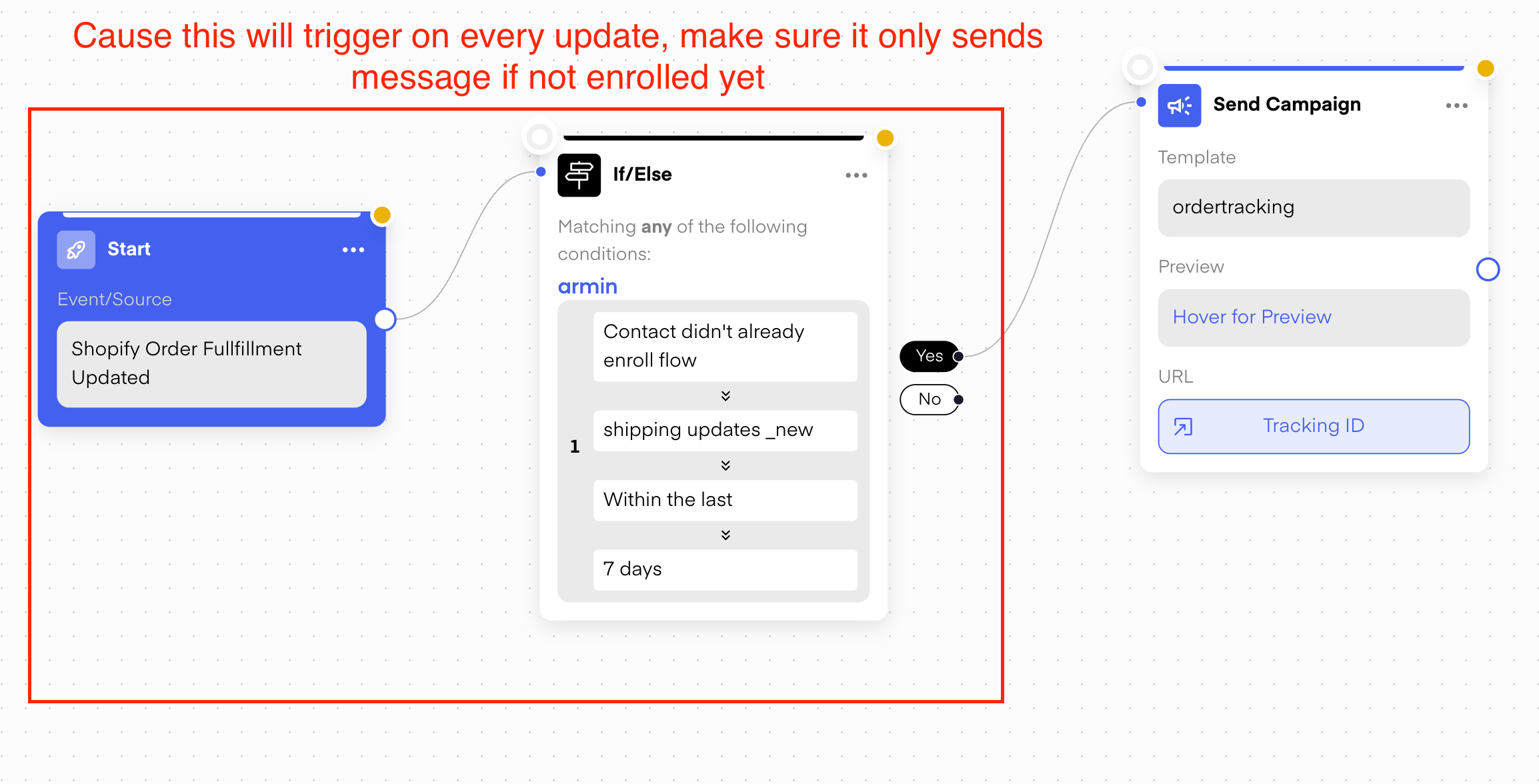
If that is the case, please try to switch the Trigger to "**Shopify Order Fulfillment Updated"** in the Flow which sends the Tracking
Just take care, when using that flow trigger, the flow would trigger on EVERY UPDATE. So to only receive the link once, add an if/else right after the trigger, thanks
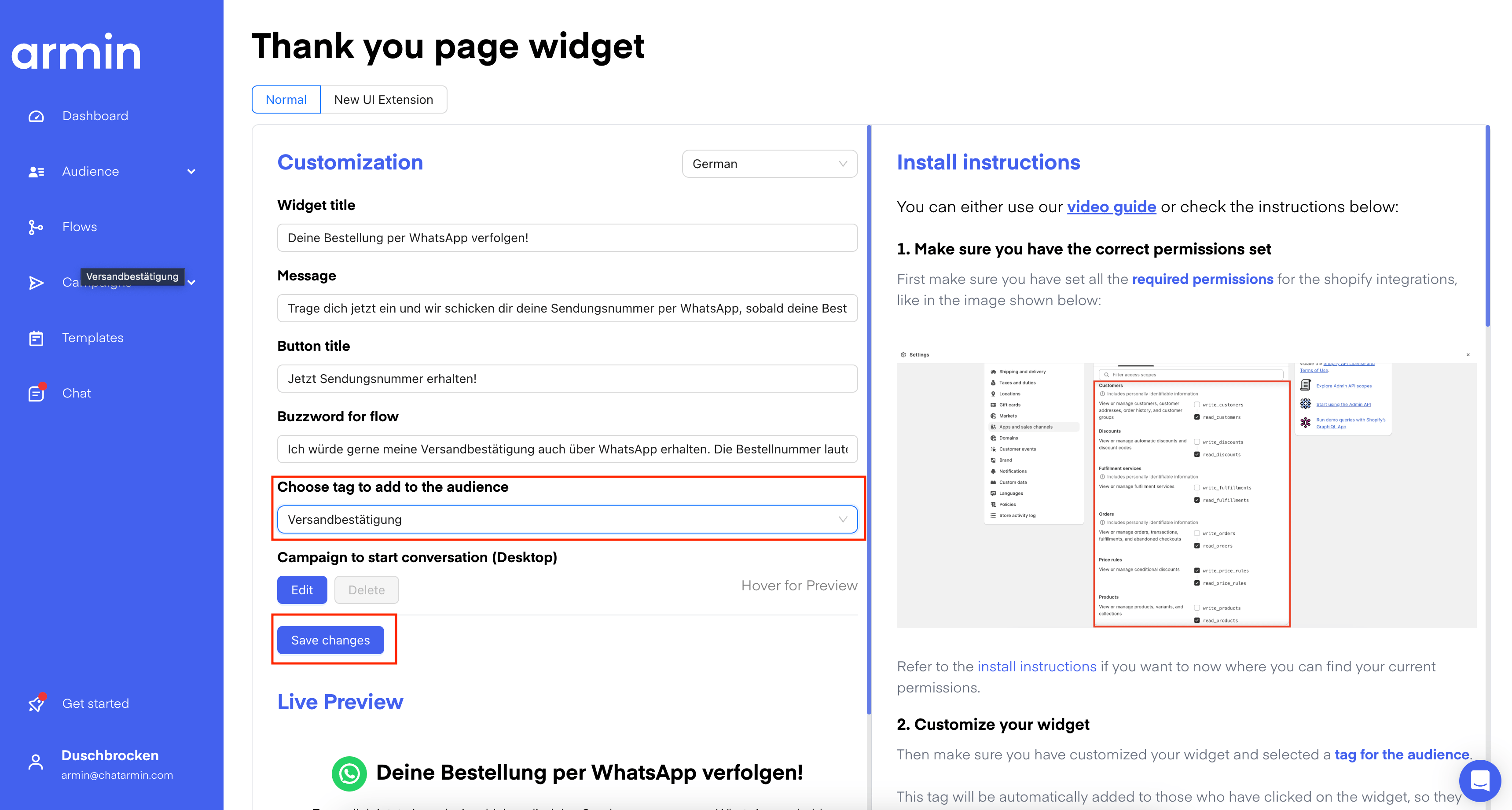 🚨 **Note:** Once setting up the Flows, note, that the "Shipping" Trigger, triggers also for Double Optins. If you don't want that and send shipment infos only to those, who have signed up for it, you need to add an additional if/else to check the Tag:
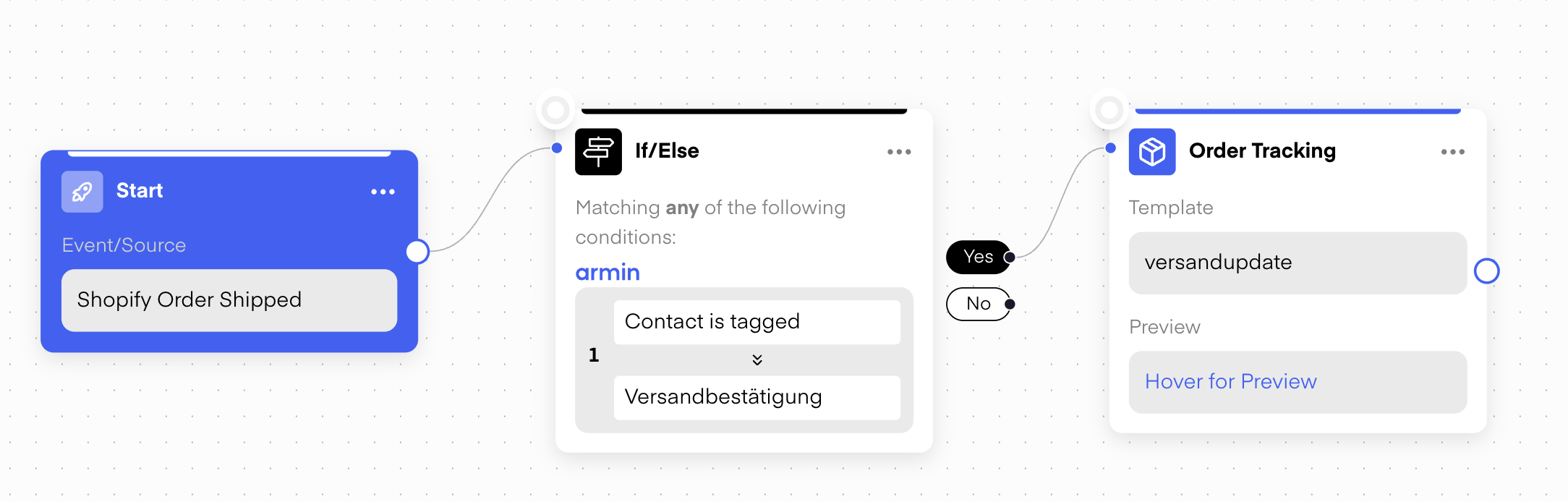 ***BONUS: Testing the thank you page widget flow: desktop 🤝***
# 🚨 Shipping flow is not triggering although Order got shipped
Due to some Shopify stores configuration with their ERP/Tracking Software, which are a bit different etc. it may be that the tracking link isn't being sent always when order got shipped already
Background behind this is that Shopify sends us the event "**Shipped**" but the tracking link will be added by their ERP like 5 Minutes afterwards etc.
If that is the case, please try to switch the Trigger to "**Shopify Order Fulfillment Updated"** in the Flow which sends the Tracking
Just take care, when using that flow trigger, the flow would trigger on EVERY UPDATE. So to only receive the link once, add an if/else right after the trigger, thanks
***BONUS: Testing the thank you page widget flow: desktop 🤝***
# 🚨 Shipping flow is not triggering although Order got shipped
Due to some Shopify stores configuration with their ERP/Tracking Software, which are a bit different etc. it may be that the tracking link isn't being sent always when order got shipped already
Background behind this is that Shopify sends us the event "**Shipped**" but the tracking link will be added by their ERP like 5 Minutes afterwards etc.
If that is the case, please try to switch the Trigger to "**Shopify Order Fulfillment Updated"** in the Flow which sends the Tracking
Just take care, when using that flow trigger, the flow would trigger on EVERY UPDATE. So to only receive the link once, add an if/else right after the trigger, thanks