> ## Documentation Index
> Fetch the complete documentation index at: https://help.chatarmin.com/llms.txt
> Use this file to discover all available pages before exploring further.
# Chatarmin × Braze Integration
> Connect Braze to sync WhatsApp consent, contact data, tags, segments, and Flow activity.
The Braze integration keeps WhatsApp customer data in Chatarmin aligned with profiles, segments, and campaigns in Braze. Chatarmin handles WhatsApp communication while Braze supports your broader customer engagement.
## Connect Braze
In Braze, open **Settings → APIs and Identifiers** and create a REST API key with these permissions:
* `users.track`
* `users.export.ids`
* `users.identify`
* `users.export.segment`
* `segments.list`
* `custom_attributes.get`
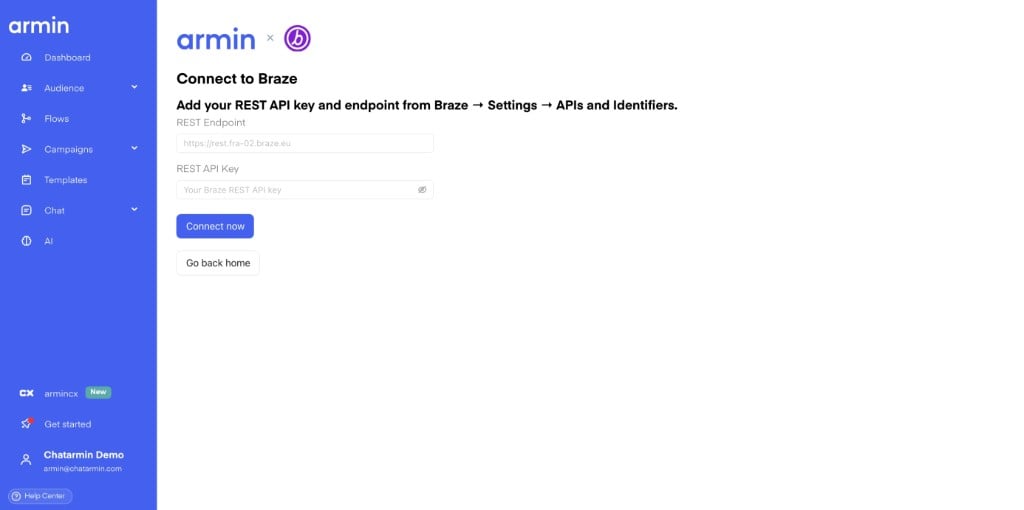
In Chatarmin, open **Integrations → Braze → Connect**. Enter the REST API key and your Braze REST endpoint. For example, an EU endpoint can be `https://rest.fra-02.braze.eu`.
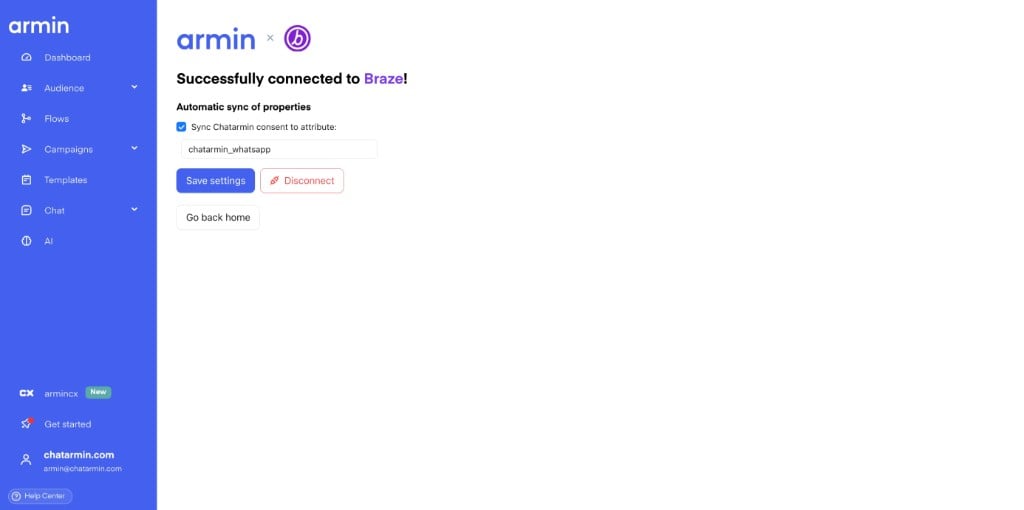
 After Chatarmin verifies the connection and loads your Braze segments, choose whether to sync WhatsApp consent automatically. You can change the Braze custom attribute used for consent; the default is `chatarmin_whatsapp`.
You can update the consent setting or disconnect Braze from the same integration page.
After Chatarmin verifies the connection and loads your Braze segments, choose whether to sync WhatsApp consent automatically. You can change the Braze custom attribute used for consent; the default is `chatarmin_whatsapp`.
You can update the consent setting or disconnect Braze from the same integration page.
 ## Contact sync
When a contact changes in Chatarmin, the integration can update the matching Braze profile. Chatarmin matches profiles using phone number, email address, or the contact's external ID.
The following data is synchronized:
* WhatsApp consent to your configured attribute, such as `chatarmin_whatsapp`
* Chatarmin tags to `Chatarmin_Tags` and the tag count to `Chatarmin_Tag_Count`
* Custom contact properties with the `chatarmin_` prefix
* Birthday to `chatarmin_birthday`
* First name, last name, email address, and phone number to standard Braze profile fields
If Braze has a name or email address that is missing in Chatarmin, Chatarmin can use that information when matching and synchronizing the contact.
Keep one Braze profile per Chatarmin contact. Merge old or test duplicates in Braze to avoid ambiguous matches.
## Use Braze segments in audiences
In Chatarmin, open **Audience → Segments** and add a **Braze segment** filter. You can select contacts who are:
* in any selected Braze segment
* in all selected Braze segments
* not in any selected Braze segment
* not in all selected Braze segments
Chatarmin loads the available segment list from your Braze account.
## Contact sync
When a contact changes in Chatarmin, the integration can update the matching Braze profile. Chatarmin matches profiles using phone number, email address, or the contact's external ID.
The following data is synchronized:
* WhatsApp consent to your configured attribute, such as `chatarmin_whatsapp`
* Chatarmin tags to `Chatarmin_Tags` and the tag count to `Chatarmin_Tag_Count`
* Custom contact properties with the `chatarmin_` prefix
* Birthday to `chatarmin_birthday`
* First name, last name, email address, and phone number to standard Braze profile fields
If Braze has a name or email address that is missing in Chatarmin, Chatarmin can use that information when matching and synchronizing the contact.
Keep one Braze profile per Chatarmin contact. Merge old or test duplicates in Braze to avoid ambiguous matches.
## Use Braze segments in audiences
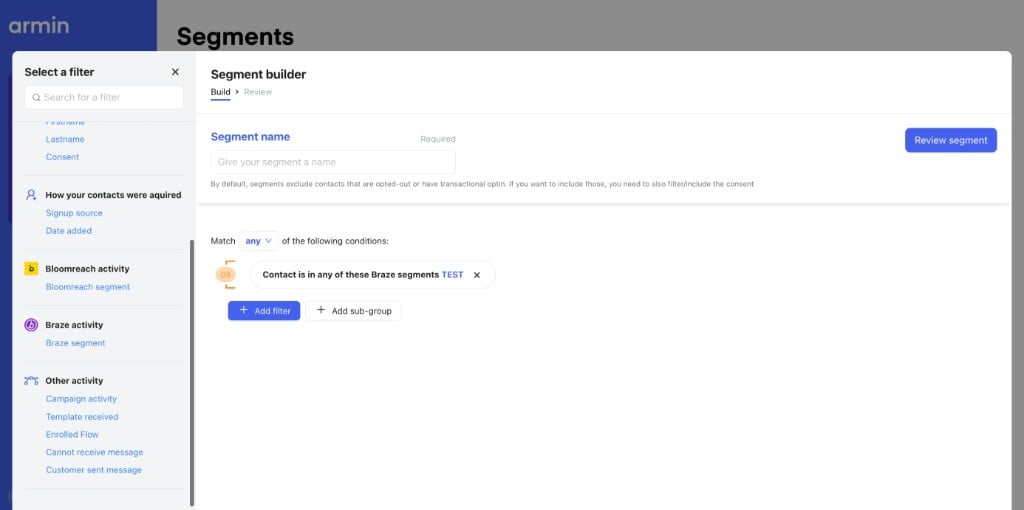
In Chatarmin, open **Audience → Segments** and add a **Braze segment** filter. You can select contacts who are:
* in any selected Braze segment
* in all selected Braze segments
* not in any selected Braze segment
* not in all selected Braze segments
Chatarmin loads the available segment list from your Braze account.
 Segment membership can take a few minutes to calculate. Long-running calculations show a processing status, and Chatarmin sends an email when a calculation taking longer than 20 seconds finishes.
## Use Braze in Flows
### Update Braze properties
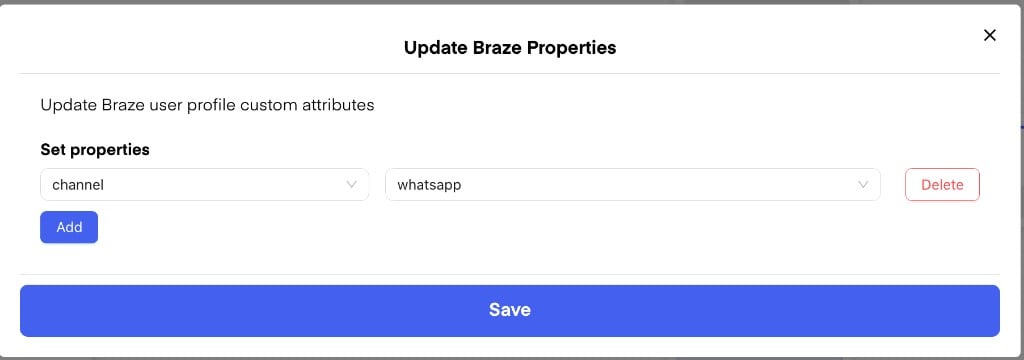
Add the **Update Braze Properties** action to update custom attributes on a contact's Braze profile. For example, save a sport preference, birthday, or another custom field collected in the Flow.
Segment membership can take a few minutes to calculate. Long-running calculations show a processing status, and Chatarmin sends an email when a calculation taking longer than 20 seconds finishes.
## Use Braze in Flows
### Update Braze properties
Add the **Update Braze Properties** action to update custom attributes on a contact's Braze profile. For example, save a sport preference, birthday, or another custom field collected in the Flow.
 ### Branch with Braze data
Use an If/Else step with:
* **Braze Properties** to branch on a custom attribute, such as `chatarmin_whatsapp`
* **Braze Segments** to check whether the contact is or is not in a selected segment
### Branch with Braze data
Use an If/Else step with:
* **Braze Properties** to branch on a custom attribute, such as `chatarmin_whatsapp`
* **Braze Segments** to check whether the contact is or is not in a selected segment
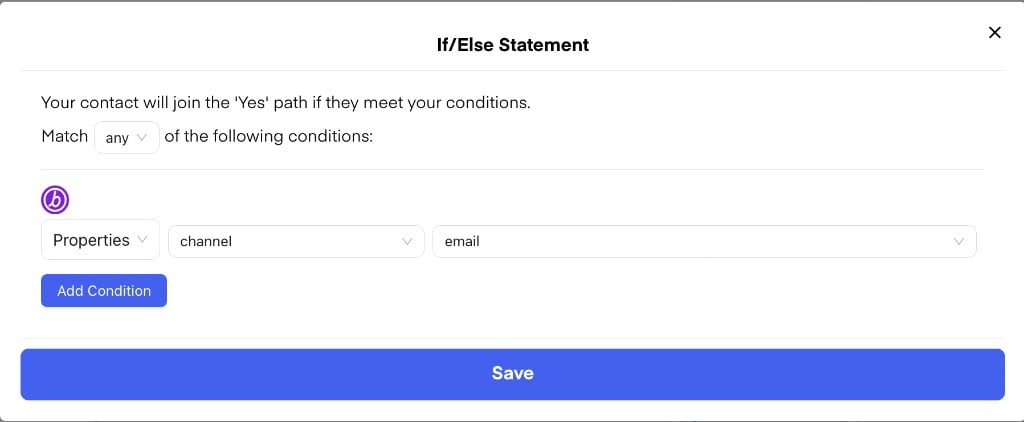
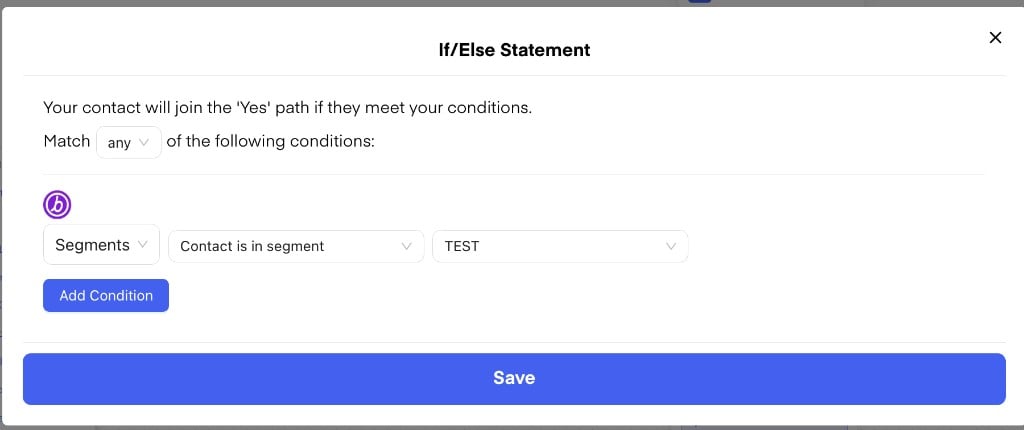 Chatarmin loads available custom attributes and segments from your Braze account. If attributes cannot be loaded, Chatarmin still provides its default attributes.
### Track Chatarmin activity in Braze
Chatarmin sends these events to the Braze user profile:
* `Chatarmin - Flow enrolled` when a contact enters a Chatarmin Flow
* `Chatarmin - Updated Profile` when Chatarmin synchronizes or updates the profile
Use these events in Braze reporting, analytics, segments, and campaigns.
## Example journey
1. Connect Braze with your REST API key and endpoint.
2. A contact opts in to WhatsApp in Chatarmin, and consent syncs to Braze.
3. Chatarmin tags appear in Braze as `Chatarmin_Tags`.
4. Create a Chatarmin audience using the Braze segment **Lapsed Users** and WhatsApp consent.
5. Send a WhatsApp campaign or enroll the audience in a Flow.
6. Branch the Flow using a Braze segment or property.
7. Update a Braze custom attribute from the Flow.
8. Review Flow enrollment events and updated attributes on the Braze profile.
## Frequently asked questions
### Do I need a developer to connect Braze?
Usually not. You need a Braze REST API key with the required permissions. Your Braze administrator or IT team may need to create it.
### Is synchronization instant?
Contact updates synchronize shortly after they change in Chatarmin. Braze segment membership can take a few minutes to process.
### Can I send WhatsApp messages to a Braze segment?
Yes. Create a Chatarmin segment filtered by Braze segment membership, then use it in a campaign or Flow.
### Does Braze show WhatsApp activity?
Yes. Braze receives Flow enrollment and profile update events as well as the synchronized profile attributes.
### Does this work with Braze EU?
Yes. Enter the REST endpoint for your Braze instance, such as `https://rest.fra-02.braze.eu`.
Chatarmin loads available custom attributes and segments from your Braze account. If attributes cannot be loaded, Chatarmin still provides its default attributes.
### Track Chatarmin activity in Braze
Chatarmin sends these events to the Braze user profile:
* `Chatarmin - Flow enrolled` when a contact enters a Chatarmin Flow
* `Chatarmin - Updated Profile` when Chatarmin synchronizes or updates the profile
Use these events in Braze reporting, analytics, segments, and campaigns.
## Example journey
1. Connect Braze with your REST API key and endpoint.
2. A contact opts in to WhatsApp in Chatarmin, and consent syncs to Braze.
3. Chatarmin tags appear in Braze as `Chatarmin_Tags`.
4. Create a Chatarmin audience using the Braze segment **Lapsed Users** and WhatsApp consent.
5. Send a WhatsApp campaign or enroll the audience in a Flow.
6. Branch the Flow using a Braze segment or property.
7. Update a Braze custom attribute from the Flow.
8. Review Flow enrollment events and updated attributes on the Braze profile.
## Frequently asked questions
### Do I need a developer to connect Braze?
Usually not. You need a Braze REST API key with the required permissions. Your Braze administrator or IT team may need to create it.
### Is synchronization instant?
Contact updates synchronize shortly after they change in Chatarmin. Braze segment membership can take a few minutes to process.
### Can I send WhatsApp messages to a Braze segment?
Yes. Create a Chatarmin segment filtered by Braze segment membership, then use it in a campaign or Flow.
### Does Braze show WhatsApp activity?
Yes. Braze receives Flow enrollment and profile update events as well as the synchronized profile attributes.
### Does this work with Braze EU?
Yes. Enter the REST endpoint for your Braze instance, such as `https://rest.fra-02.braze.eu`.