> ## Documentation Index
> Fetch the complete documentation index at: https://help.chatarmin.com/llms.txt
> Use this file to discover all available pages before exploring further.
# Back-in-stock WhatsApp feature
> Chatarmin guide: Back-in-stock WhatsApp feature
**🚨 Check out our YouTube Video Guide (German) on how to implement this feature, otherwise read the article below:**
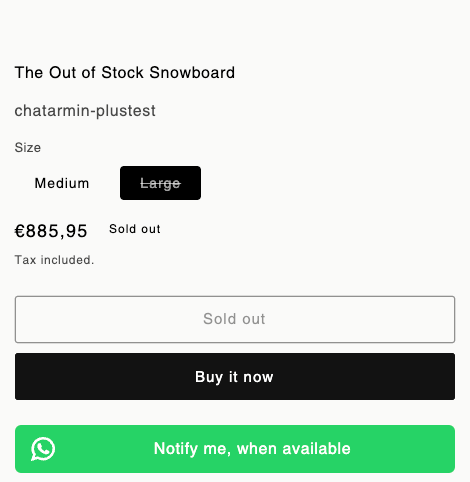
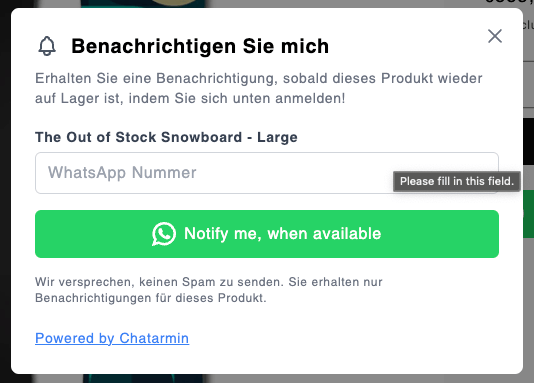
Recover lost sales through back-in-stock notifications. When products are restocked, it sends automated alerts via WhatsApp to customers who opted in. Features include
* a customizable "Notify Me" button,
* support for multiple languages,
* GDPR compliance, and
* direct checkout redirection.
Additionally, stores gain insights on popular products and can export data, schedule reminders, and resend alerts as needed.
# Shopify
## Video Walkthrough and Setup
## Customization
* sticky widget
* fixed CTA on pdp
all can be customised for **Desktop & Mobile** appearances [here](https://chatarmin.com/dashboard/shopify)
## One Flow, for all Signups
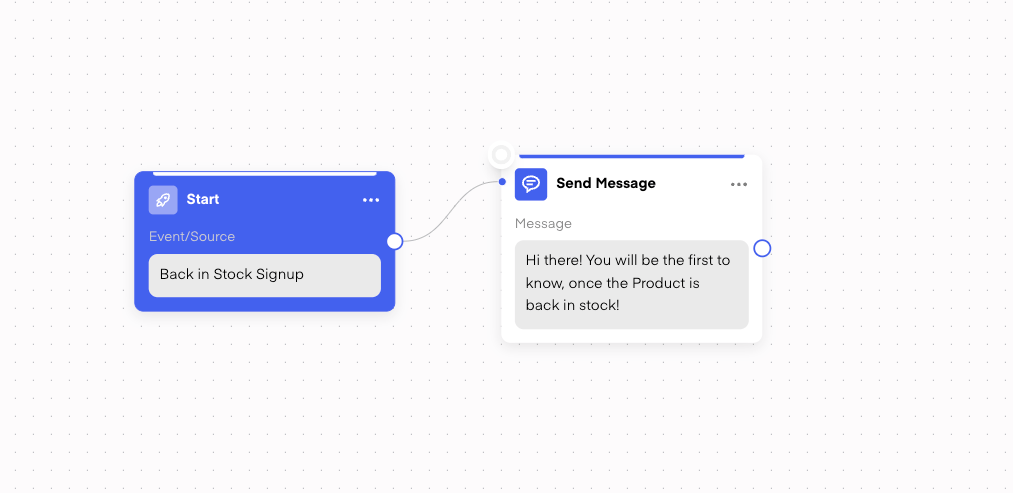
Doesn't matter what language/buzzword or if the customer has signed up through **Mobile** or **Desktop.** In Chatarmin you can create ONE Flow with the Trigger **"Signed up for 'Back in Stock'":**
For all new Signups, the flow adds a Tag about the Product to their profile.
A Tag with the label "**BIS / Product X**" -> Whereas "Product X" is the product/variant name
So now you can even filter your audience based on that Tags
## One Flow, for all 'Back in Stock' Products
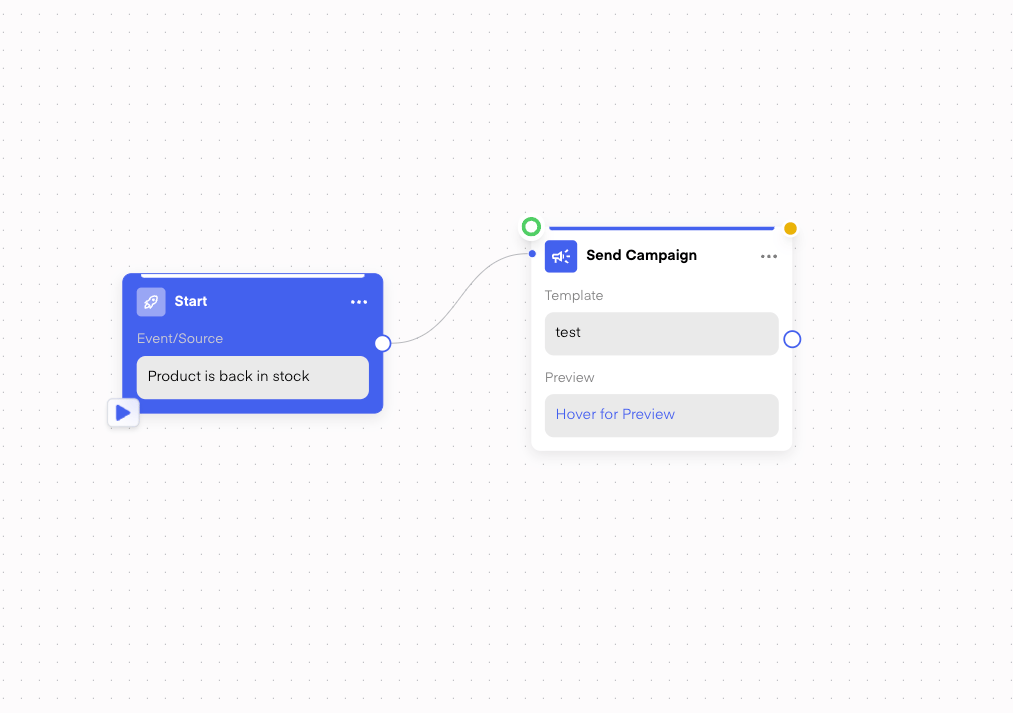
When choosing the Trigger **"Product is 'Back in Stock'"**
-> That Flow will listen for all the upcoming restocks and then trigger the Flow only for those, **who have signed up to that restocked Product**. Exactly for that, we have that unique Tag from their previous signup (mentioned above)
You can also customize when the **Back in Stock** notification is triggered, specifically in terms of the **quantity of products** that need to be back in stock before the notification is sent. You can adjust the settings in the **Back in Stock flow** so that the notification is only triggered when the **stock level reaches a minimum threshold** (e.g., 500 units). This ensures that the notification is sent only when there are enough items available, preventing messages from being sent prematurely due to small restocks (like a single returned item).
Since the Trigger can trigger for different Products, it also comes with "**Variables**" you can use for the Image or in Variables of a Template. So you can for example set the Image for a template like so:
## Testing the Flow
For the above Flow, with the Trigger **Product is 'Back in Stock'**,you can also use our new functionality to test your flow with a specified product:
## Live Examples of Chatarmin WhatsApp Back-in-stock-Feature D2C Brands
*Source: MatchaLand, Q4 2024*
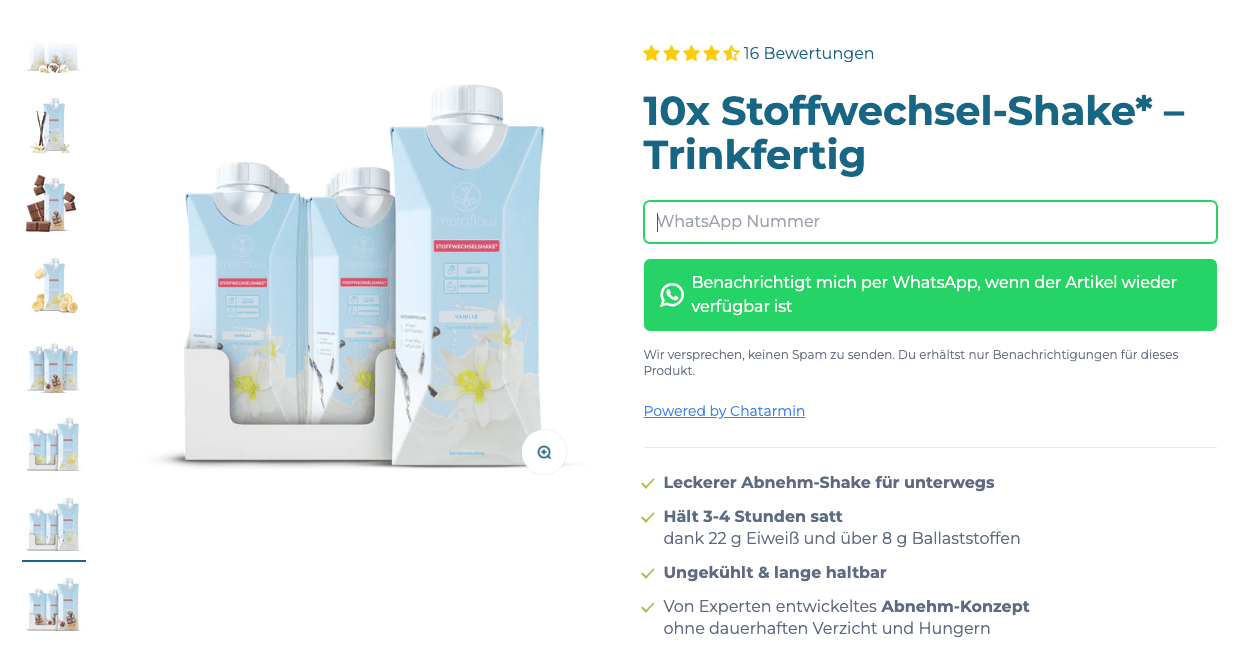
*Source: MetaFlow, Q4 2024*
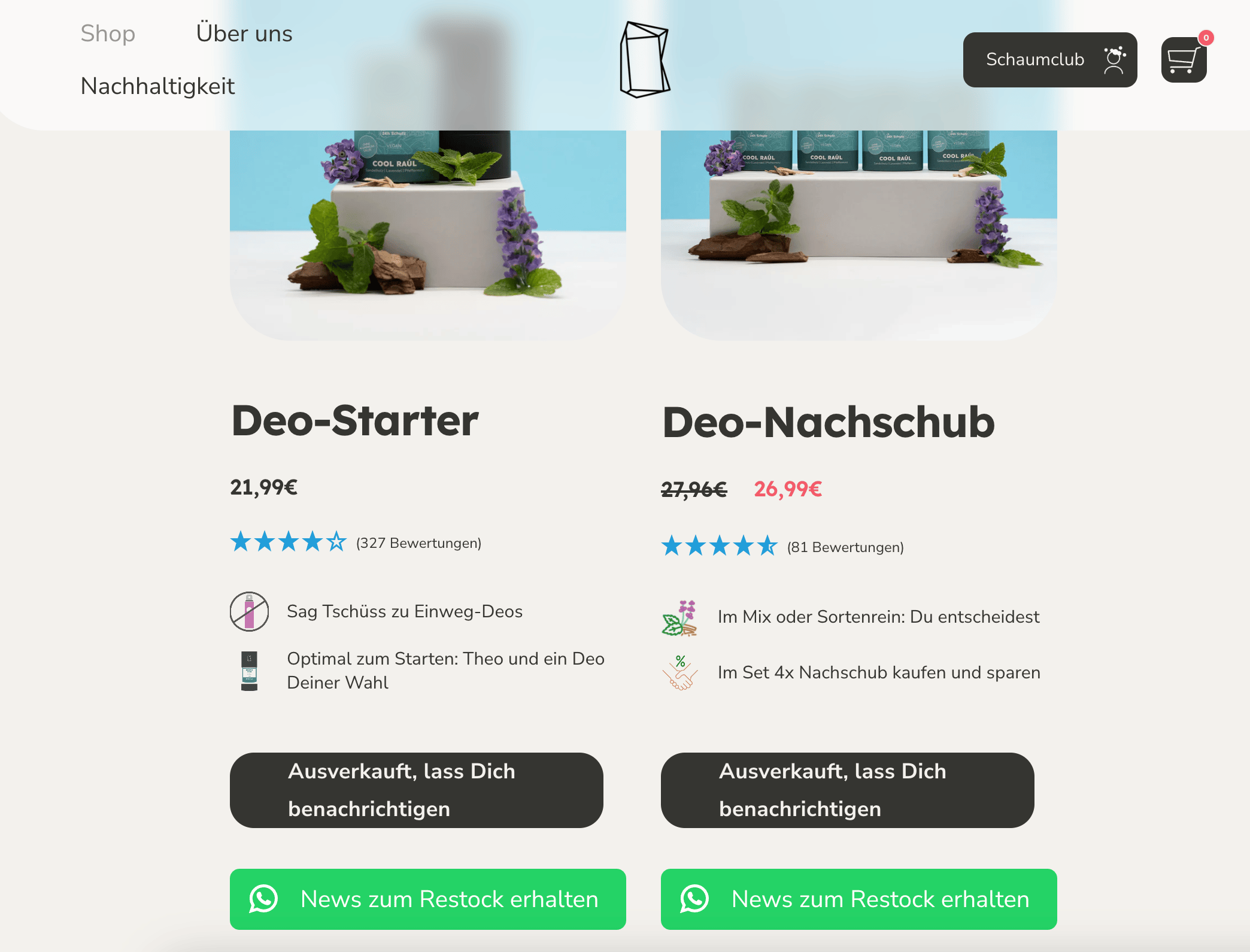
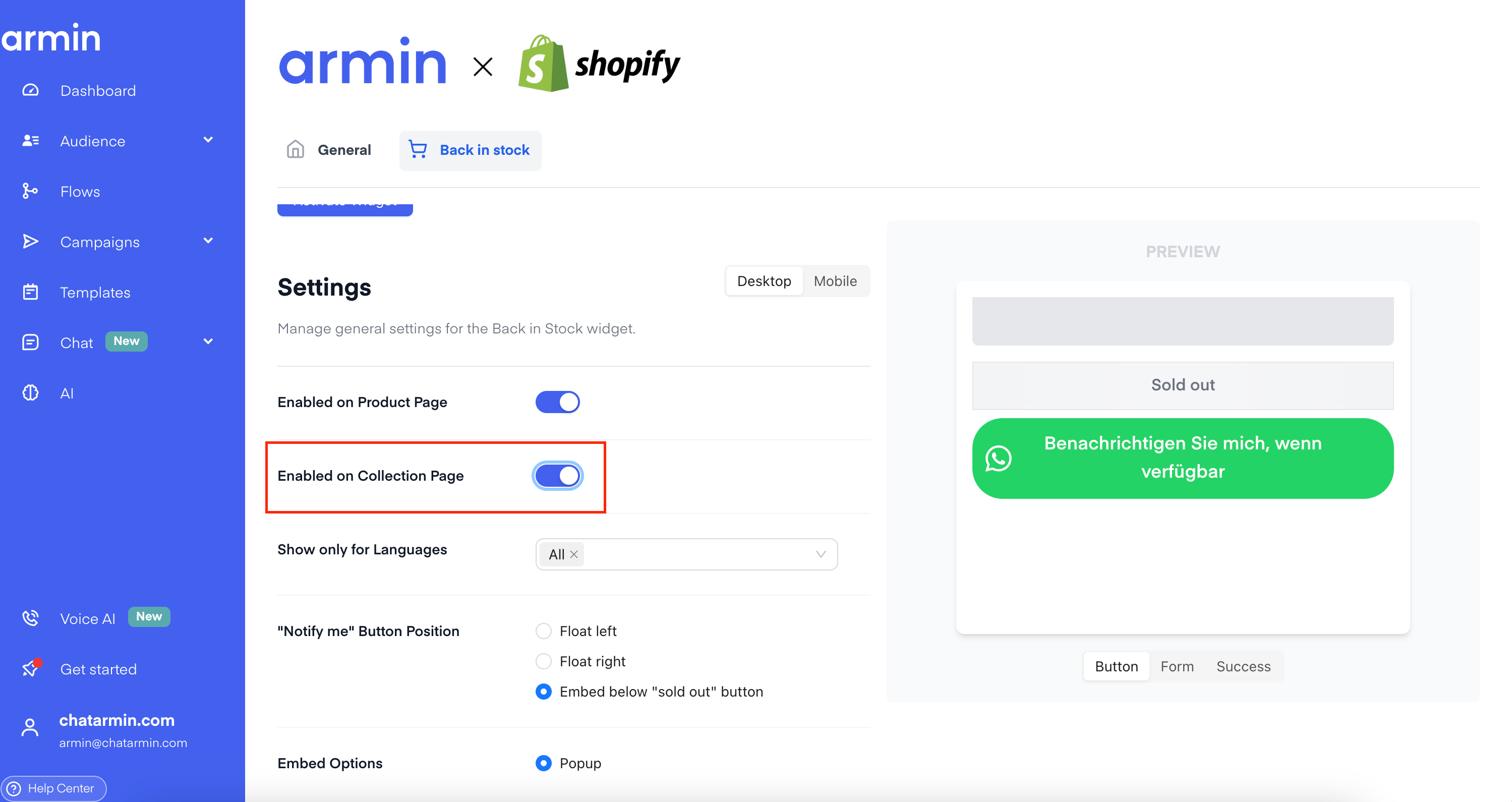
## Back in Stock Widget now also on "Collection Pages"
Q1, 2025
## WooCommerce
[Talk to the Team](https://chatarmin.com/a/demo)
## Shopware
[Talk to the Team](https://chatarmin.com/a/demo)
# How does it behave with other 'Back in Stock' Widgets?
Our Widget/Button can be placed in different positions. Just find the one which suits you best or try to A/B Test Email & WhatsApp ✌️
 Recover lost sales through back-in-stock notifications. When products are restocked, it sends automated alerts via WhatsApp to customers who opted in. Features include
* a customizable "Notify Me" button,
* support for multiple languages,
* GDPR compliance, and
* direct checkout redirection.
Additionally, stores gain insights on popular products and can export data, schedule reminders, and resend alerts as needed.
# Shopify
## Video Walkthrough and Setup
## Customization
* sticky widget
* fixed CTA on pdp
all can be customised for **Desktop & Mobile** appearances [here](https://chatarmin.com/dashboard/shopify)
Recover lost sales through back-in-stock notifications. When products are restocked, it sends automated alerts via WhatsApp to customers who opted in. Features include
* a customizable "Notify Me" button,
* support for multiple languages,
* GDPR compliance, and
* direct checkout redirection.
Additionally, stores gain insights on popular products and can export data, schedule reminders, and resend alerts as needed.
# Shopify
## Video Walkthrough and Setup
## Customization
* sticky widget
* fixed CTA on pdp
all can be customised for **Desktop & Mobile** appearances [here](https://chatarmin.com/dashboard/shopify)
 ## One Flow, for all Signups
Doesn't matter what language/buzzword or if the customer has signed up through **Mobile** or **Desktop.** In Chatarmin you can create ONE Flow with the Trigger **"Signed up for 'Back in Stock'":**
## One Flow, for all Signups
Doesn't matter what language/buzzword or if the customer has signed up through **Mobile** or **Desktop.** In Chatarmin you can create ONE Flow with the Trigger **"Signed up for 'Back in Stock'":**
 For all new Signups, the flow adds a Tag about the Product to their profile.
A Tag with the label "**BIS / Product X**" -> Whereas "Product X" is the product/variant name
So now you can even filter your audience based on that Tags
## One Flow, for all 'Back in Stock' Products
When choosing the Trigger **"Product is 'Back in Stock'"**
-> That Flow will listen for all the upcoming restocks and then trigger the Flow only for those, **who have signed up to that restocked Product**. Exactly for that, we have that unique Tag from their previous signup (mentioned above)
For all new Signups, the flow adds a Tag about the Product to their profile.
A Tag with the label "**BIS / Product X**" -> Whereas "Product X" is the product/variant name
So now you can even filter your audience based on that Tags
## One Flow, for all 'Back in Stock' Products
When choosing the Trigger **"Product is 'Back in Stock'"**
-> That Flow will listen for all the upcoming restocks and then trigger the Flow only for those, **who have signed up to that restocked Product**. Exactly for that, we have that unique Tag from their previous signup (mentioned above)
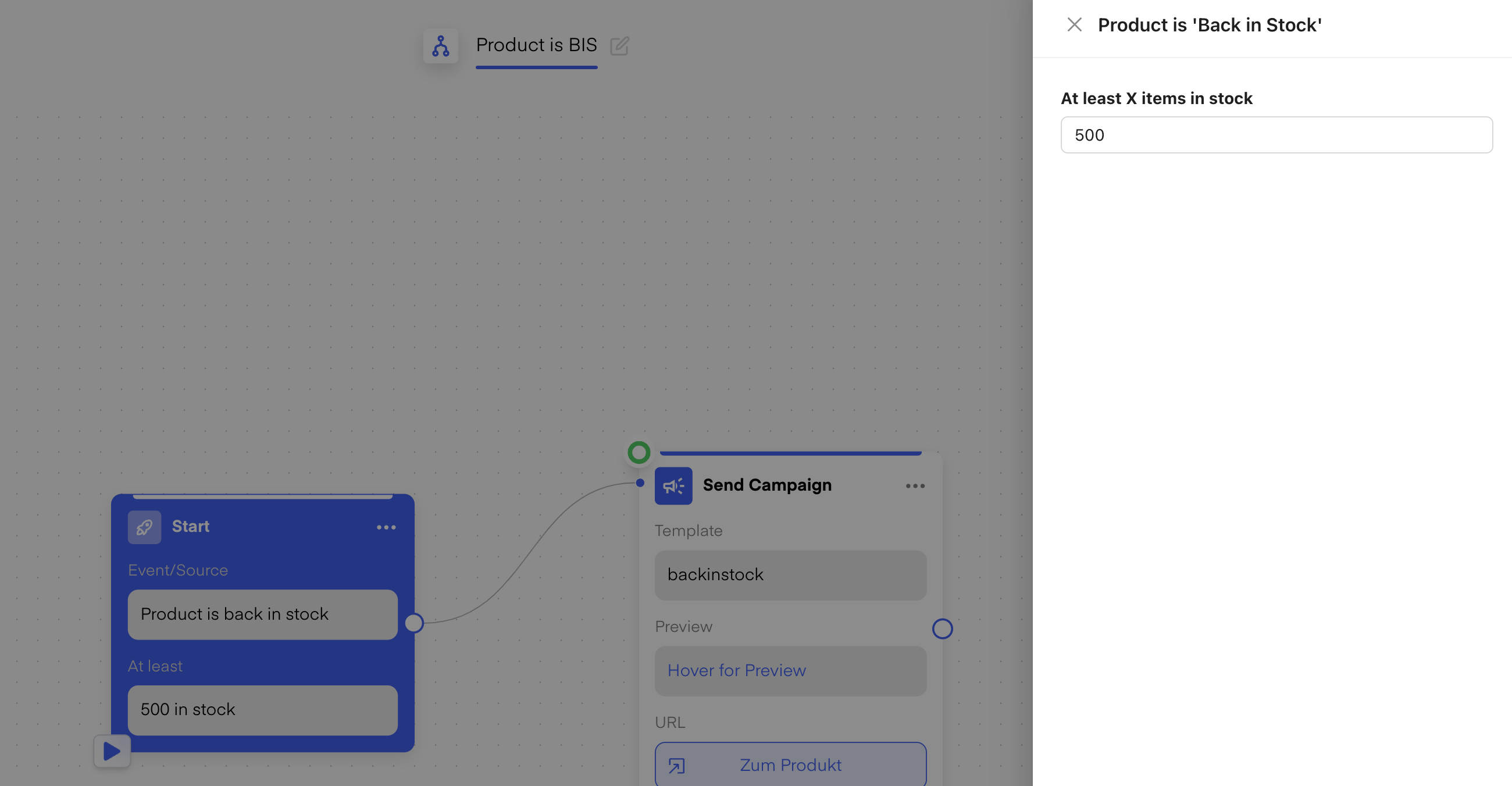
 You can also customize when the **Back in Stock** notification is triggered, specifically in terms of the **quantity of products** that need to be back in stock before the notification is sent. You can adjust the settings in the **Back in Stock flow** so that the notification is only triggered when the **stock level reaches a minimum threshold** (e.g., 500 units). This ensures that the notification is sent only when there are enough items available, preventing messages from being sent prematurely due to small restocks (like a single returned item).
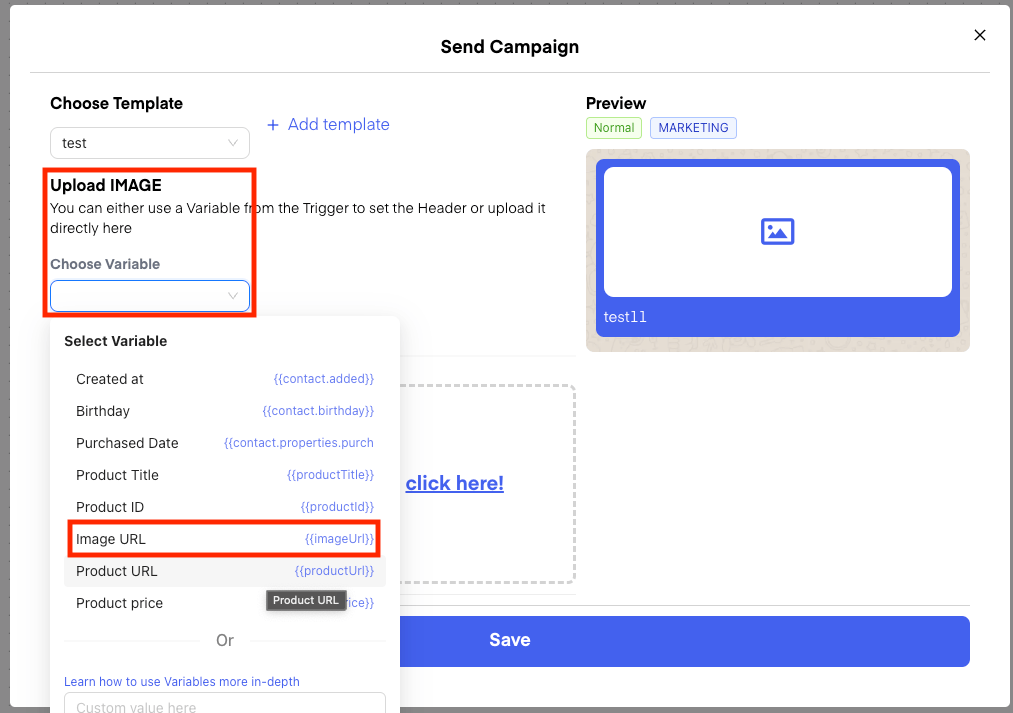
 Since the Trigger can trigger for different Products, it also comes with "**Variables**" you can use for the Image or in Variables of a Template. So you can for example set the Image for a template like so:
 ## Testing the Flow
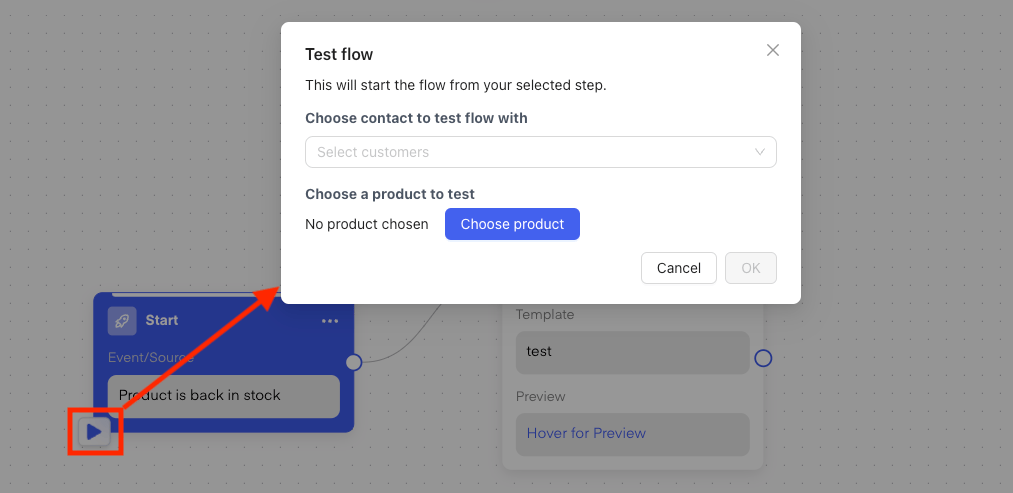
For the above Flow, with the Trigger **Product is 'Back in Stock'**,you can also use our new functionality to test your flow with a specified product:
## Testing the Flow
For the above Flow, with the Trigger **Product is 'Back in Stock'**,you can also use our new functionality to test your flow with a specified product:
 ## Live Examples of Chatarmin WhatsApp Back-in-stock-Feature D2C Brands
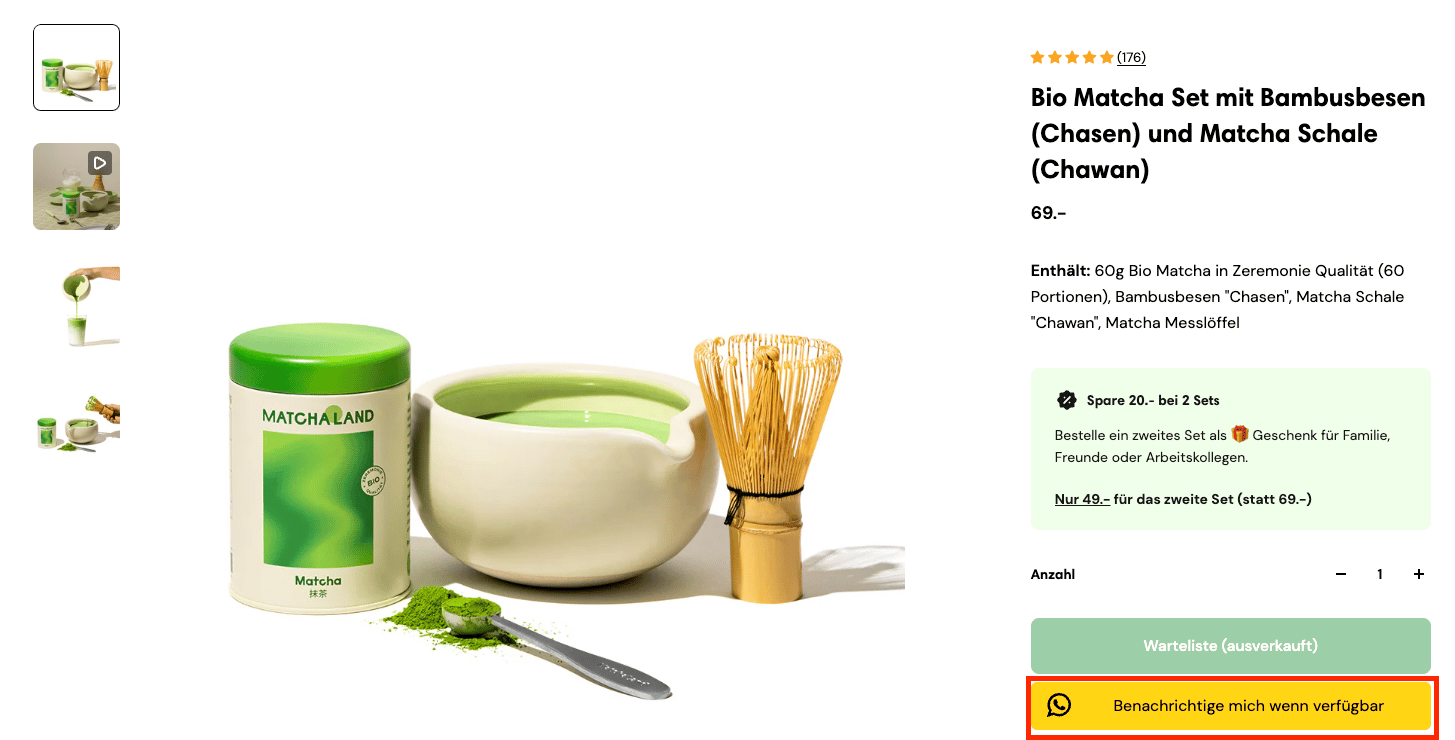 *Source: MatchaLand, Q4 2024*
 *Source: MetaFlow, Q4 2024*
## Back in Stock Widget now also on "Collection Pages"
*Source: MetaFlow, Q4 2024*
## Back in Stock Widget now also on "Collection Pages"
 Q1, 2025
## WooCommerce
[Talk to the Team](https://chatarmin.com/a/demo)
## Shopware
[Talk to the Team](https://chatarmin.com/a/demo)
# How does it behave with other 'Back in Stock' Widgets?
Our Widget/Button can be placed in different positions. Just find the one which suits you best or try to A/B Test Email & WhatsApp ✌️
Q1, 2025
## WooCommerce
[Talk to the Team](https://chatarmin.com/a/demo)
## Shopware
[Talk to the Team](https://chatarmin.com/a/demo)
# How does it behave with other 'Back in Stock' Widgets?
Our Widget/Button can be placed in different positions. Just find the one which suits you best or try to A/B Test Email & WhatsApp ✌️