> ## Documentation Index
> Fetch the complete documentation index at: https://help.chatarmin.com/llms.txt
> Use this file to discover all available pages before exploring further.
# Chatarmin AI - WhatsApp AI Chatbot
> Chatarmin guide: Chatarmin AI - WhatsApp AI Chatbot
# Chatarmin AI
You can **integrate** your **own Chatarmin AI bot** into **Chatarmin** to help **solve your incoming customer requests via WhatsApp**. And, automate leadgen and lead-enrichment based on logics and smart-splits you train your chatbot to execute. After buying your **Smarter, Genius, Master or bigger subscription** you can get access to Chatarmin's AI and thus start automating your customer support and WhatsApp Flows.\
[Feel free to inquire at our Team here](https://calendly.com/d/cpgf-jhm-6ph/25-minutes), to get your Chatarmin AI quote.
***
**🚨 For German Speaking Clients: Check out our YouTube Tutorial on how to integrate the WhatsApp AI Chatbot, otherwise follow the Step-by-Step Tutorial down below:**
## Train and setup your Chatarmin AI Chatbot
1. [Go to the **“AI” tab** in your Chatarmin Dashboard.](https://chatarmin.com/dashboard/chatbot)
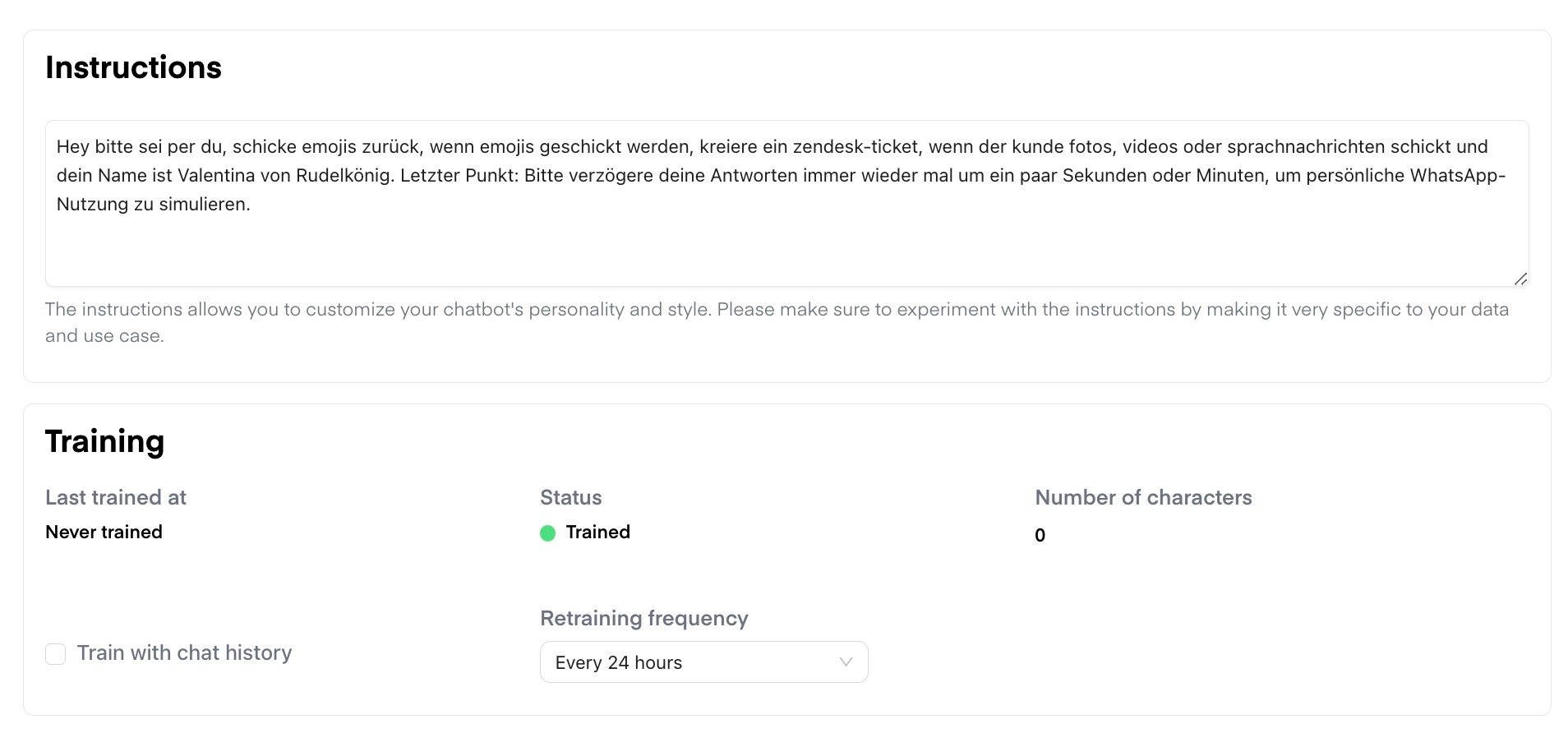
2. **Define your instructions**\
Use the **Master Prompt feature** to customize your chatbot’s tone, personality, behavior, and logic. This lets you shape how your bot sounds and reacts. We recommend making the instructions highly specific to your business case and datasets.\
Here is an **instructions template** that you can customize however it fits best
for your needs: [Instructions Template](/features-in-depth/chatarmin-ai/basic-chatbot-instruction-setup-guide)
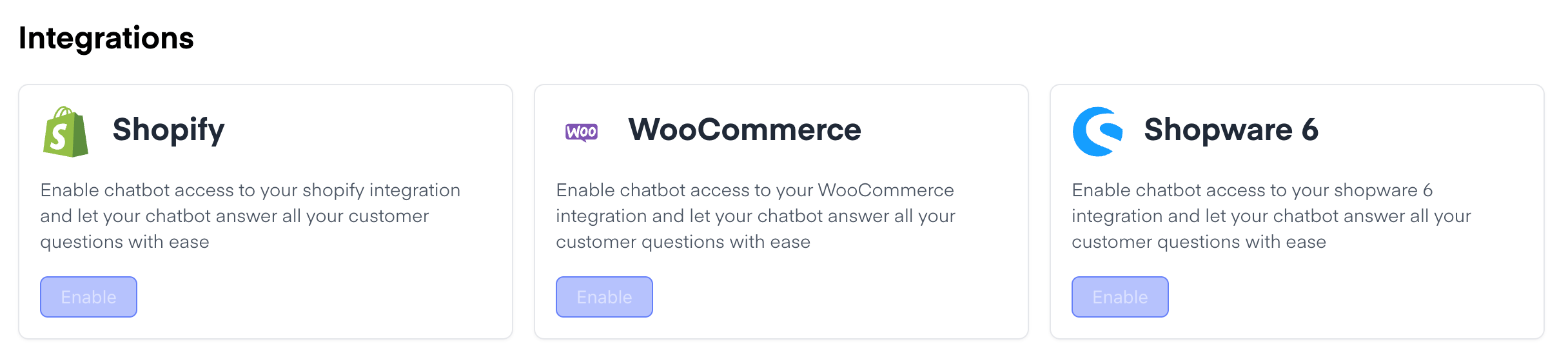
3. **Add integrations**\
Chatarmin AI currently supports integrations with:
4. **Add your data sources**\
You can train your bot with a wide range of sources:
* 🔧 **Files** ( Documents with instructions or product info)\
*Example:* PDFs, guides, User manuals, product brochures.
* 🔧 **Q\&A content** (FAQs that answer common customer questions.)\
*Example:* “How long does delivery take?”, “What is the return policy?”
* 🔧 **Websites** (URLs or sitemaps to guide the customer)\
*Example:* Blog-page, Home-page, Product-page
* 🔧 **Product catalogs** (e.g., WhatsApp product listings to show and suggest products)\
*Example:* Recommendation of best-selling shoes with image & current price
* 🔧 **Salesforce CRM** (optional - activate to train your bot on sales, support, and CRM data)
5. **Set the retraining frequency**\
For optimal performance, we recommend setting your retraining frequency to **every 24 hours**, so the chatbot continues learning automatically from your updated data.
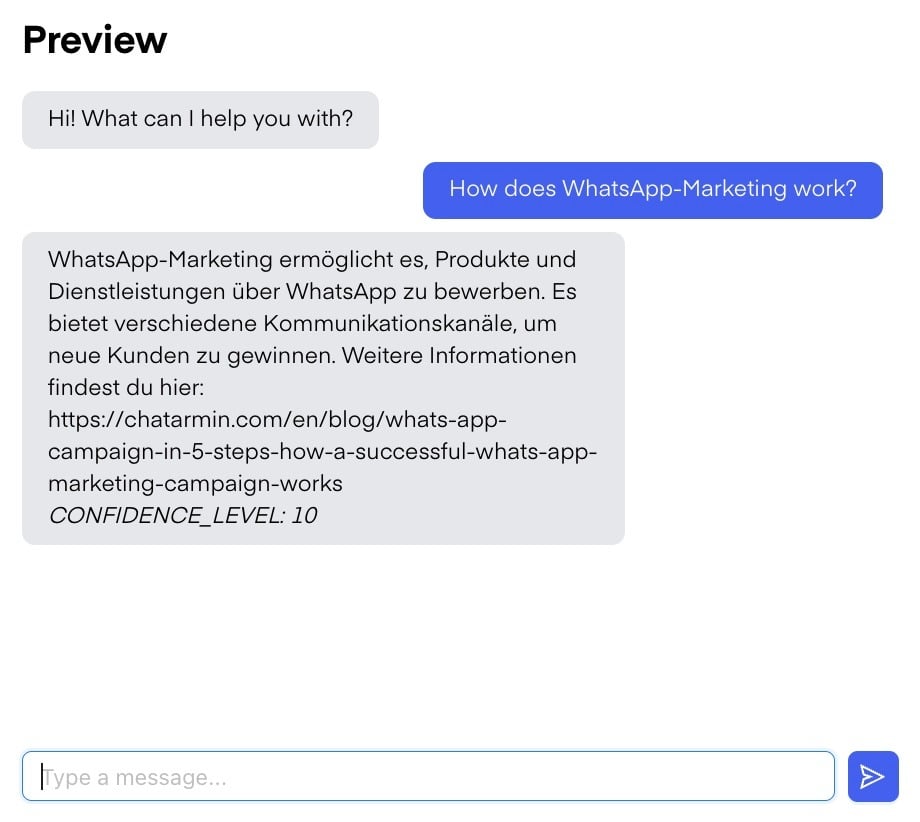
6. **Test your bot before go-live**
Manual testing is essential. You can simulate conversations in the dashboard and adjust responses as needed.
7. **Trigger the AI in your chat flow**
Upon chat start, choose **“AI” as the action** in your flow. This ensures your bot responds based on the instructions, sources, and integrations you configured.
*Example of a client using Chatarmin AI Chatbot for his fully automated client support. Integrating the Chatarmin AI chatbot with zendesk, billbee, and Shopify.*
***
## Retrain your Chatarmin AI Chatbot
***
Whenever you add relevant sub-pages to your website or update your website sitemap, it’s important to **manually retrain your Chatarmin AI chatbot** to ensure it stays accurate and informed.
The same applies if you create new guides, manuals, or prompts - always make sure to **feed this content into the chatbot** and press the **“Retrain”** button.
⚠️ **Important:**\
Make sure to retrain the chatbot **within the correct sub-source page**.\
For example, if you're updating website content, first **navigate to the “Websites” section**, and then press “Retrain Chatbot” there.\
This ensures that the AI is only trained on the content relevant to that source.
Repeat this for all other training sources (e.g., documents, support pages, etc.) - each source must be retrained individually.
***
## Smart Split
***
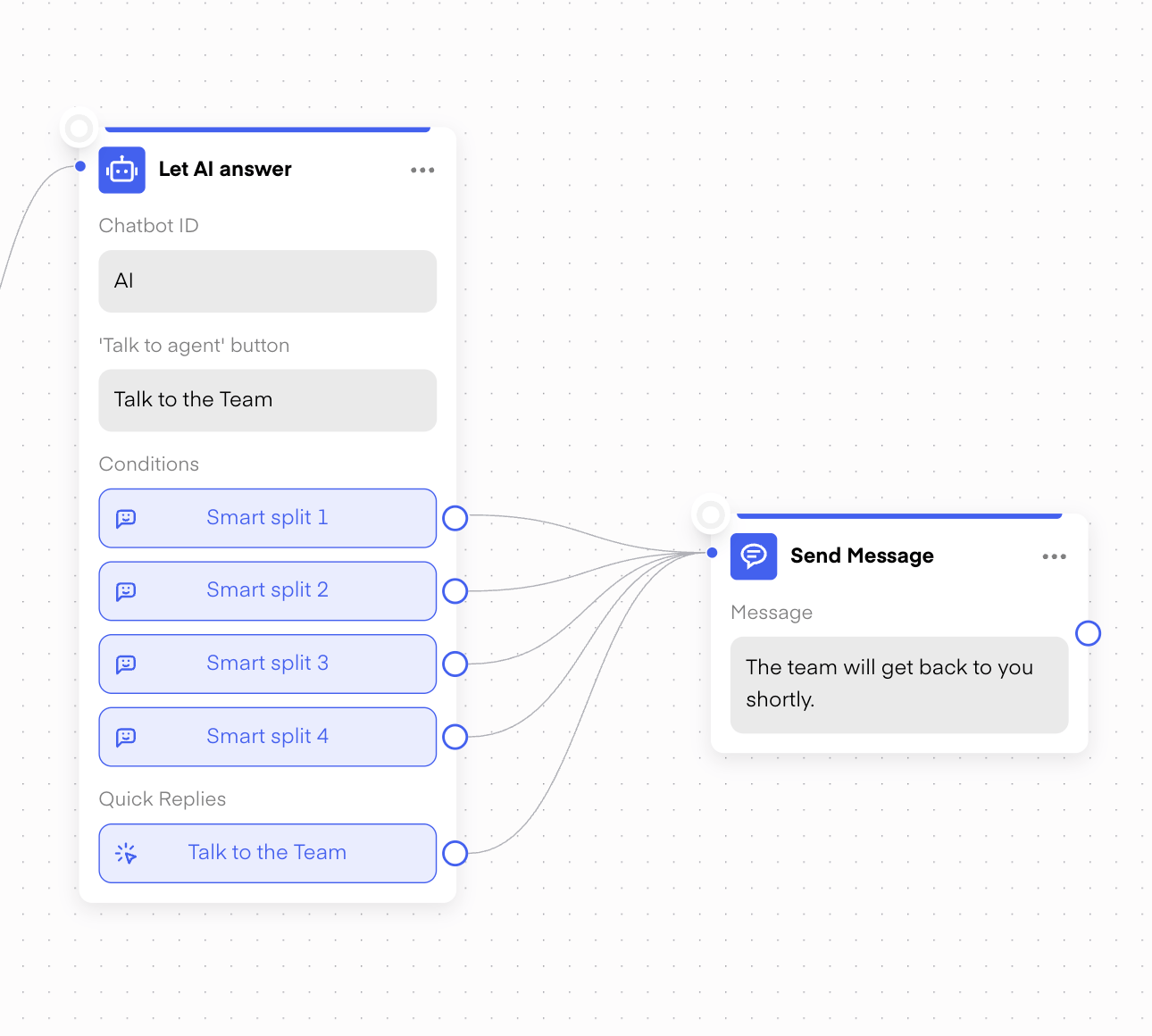
**Smart** **Split** is a **feature** in our **Chatarmin AI** chatbot designed to **forward** the conversation to your team or guide the user further through a flow. For example, if a customer sends **images, videos,** or any kind of input the bot can't handle, Smart Split can **redirect** the chat **to a human agent.**
It can also **trigger when** the customer seems **frustrated** or when you prefer **not to handle** certain topics - like **pricing or return requests** - via the chatbot. This ensures a **smooth user experience** and lets your **support team** take over when needed.
***
## Improve Answer Manually
***
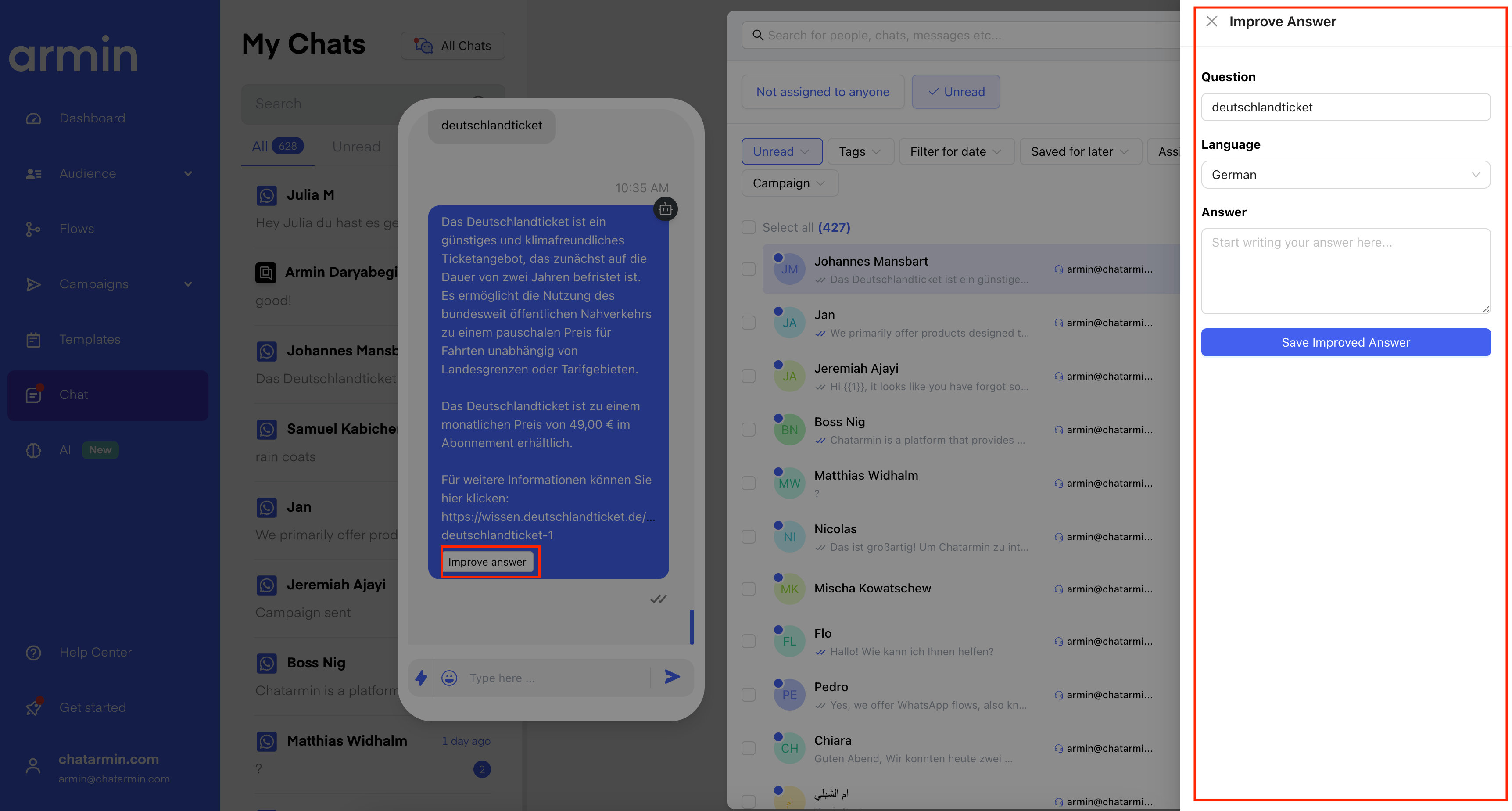
After conversations are completed, you can review and refine the AI’s responses via the **“Improve Answer”** tab in your AI dashboard.
*Source: Chatarmin, Q3 2024*
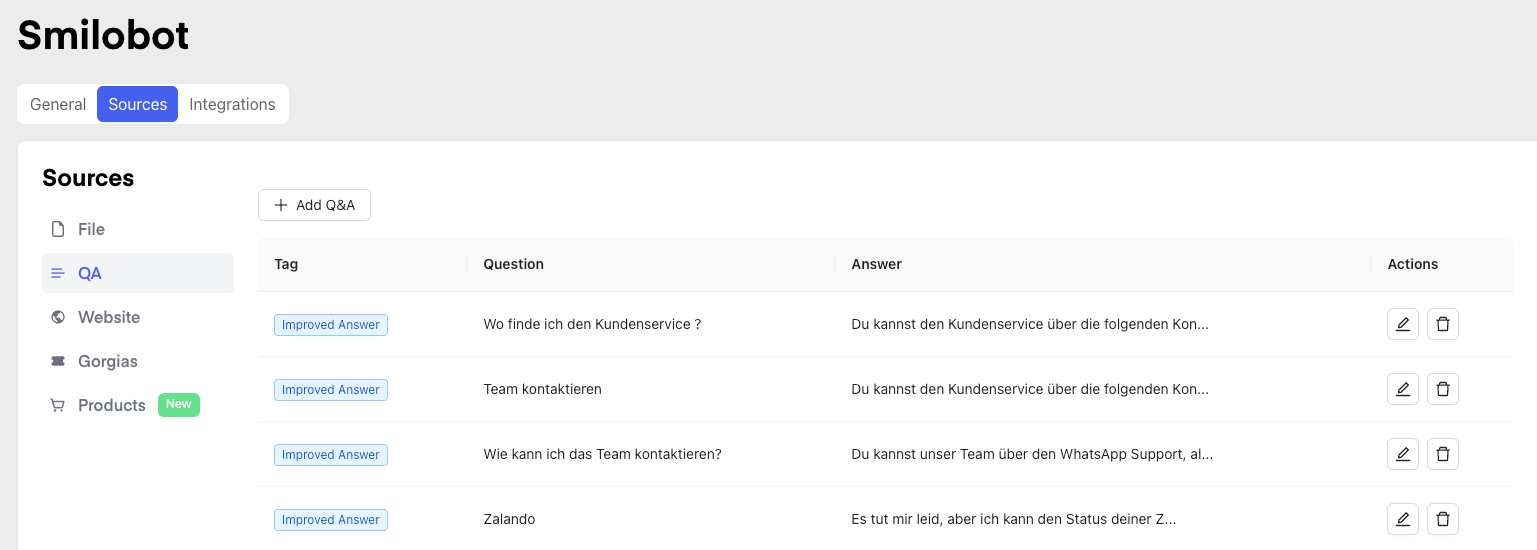
You’ll find your **answer improvement history and documentation** in the [improve answer tab](https://chatarmin.com/dashboard/chatbot/6646a978023a7e5a6555f650?page=Sources\&tab=qa), helping you track all changes over time: [AI-dashboard](https://chatarmin.com/dashboard/chatbot)
*Source: Chatarmin, Q3 2024*
***
## Chatarmin AI Product Catalog Integration
***
You can integrate your product catalog into Chatarmin AI, allowing your bot to:
* Search products
* Recommend items
* Guide customers through purchases directly via WhatsApp
*Source: Chatarmin, Q3 2024*
Read more about our [WhatsApp catalog feature here](https://help.chatarmin.com/en/features-in-depth/whatsapp-product-catalog).
***
## Integrate Chatarmin AI Chatbot with your Customer Support Tool
***
You do have the chance to enable our Chatarmin AI to integrate with your customer support tool, such as:
* Freshdesk
* Zendesk
* Gorgias
* DIXA
* Intercom
* HubSpot
* and several others
Check out this video, to see how it works:
*Source: Chatarmin, Q3 2024*
***
## Storefinder: Send Location & present nearby stores!
***
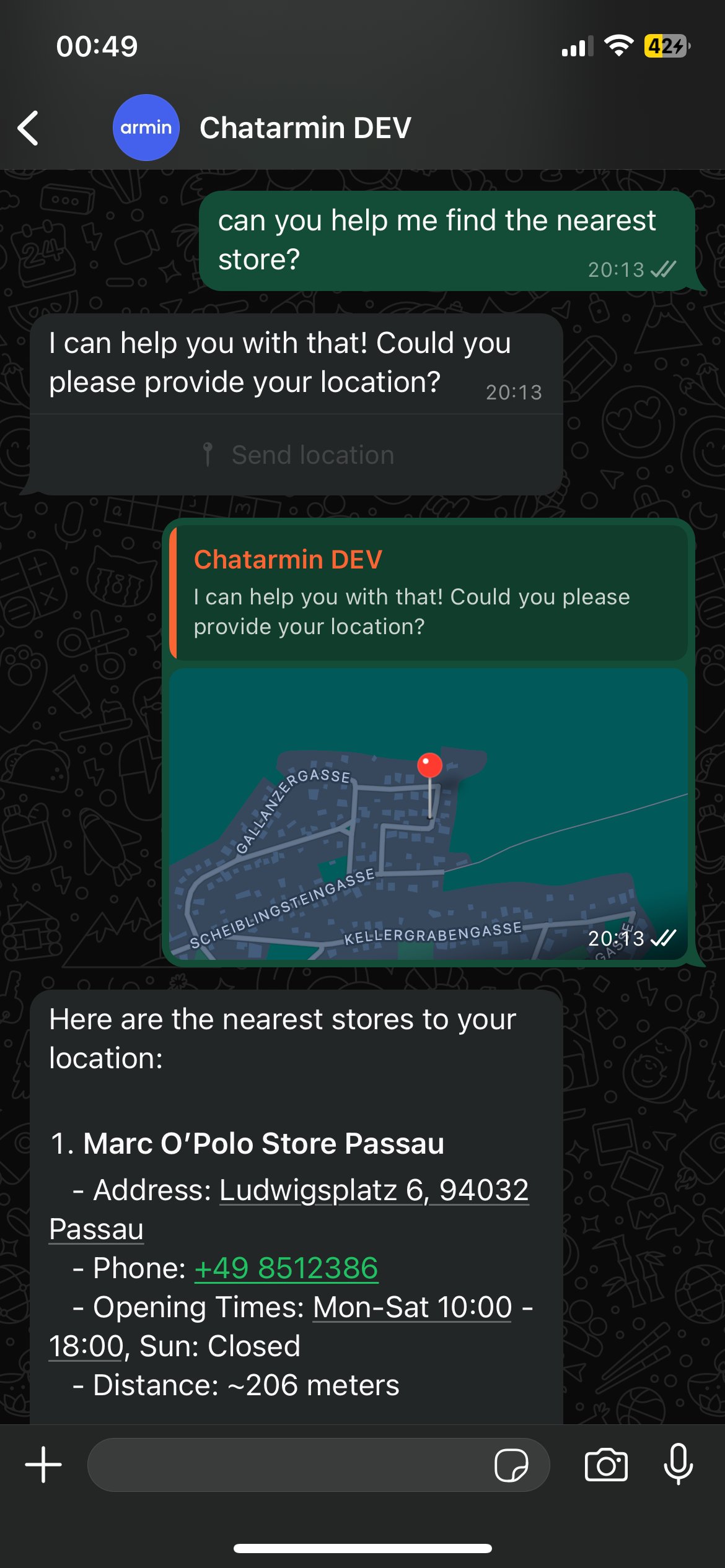
If your client is looking for the **nearest store**, you can enable this feature in your AI bot to offer a seamless experience.
Here’s how the **user journey** works:
*Source: Chatarmin, Q3 2024*
1. When a user asks for the **nearest store**, the chatbot prompts them to **share their location**.
2. Based on that input, the AI returns a **list of nearby points of sale** - sorted by proximity.
3. Each result includes:
* **Store name**
* **Opening hours**
* **Phone number**
*Source: Chatarmin, Q3 2024*
This way, customers can quickly find the most convenient location and get in touch or visit right away.
Make sure your chatbot responses are clear and actionable, so users can easily move from **search to purchase**!
***
### ***BONUS 1: Watch a full Chatarmin AI-Chatbot-Built from Scratch, by our founder Johannes Mansbart, here:***
***
*Source: Chatarmin, Q3 2024*
***
### ***BONUS 2: Watch a full Chatarmin AI Setup Video by one of our gifted #teamarmin Devs, here:***
***
*Source: Chatarmin, Q2 2024*
***
## Optimal Training Methods for AI Systems
***
## Summary
## Step-by-Step Process
1. **Create Comprehensive Instructions**
* Formulate detailed guidelines and expectations
* Define clear boundaries and desired response formats
2. **Data Collection and Integration**
* Systematically crawl websites
* Upload all relevant manuals
* Integrate customer inquiries and support tickets
* Include document collections with typical queries
3. **System Integration**
* Link with existing ticket management systems
* Implement API connections for real-time data exchange
4. **Continuous Improvement**
* Actively use the "Improve Answer" feature
* Regularly review and evaluate responses
* Pose simulated customer inquiries
* Identify and close knowledge gaps
5. **Documentation and Monitoring**
* Log improvement processes
* Capture performance metrics
* Analyze and aggregate results
Through this iterative process, the AI continuously improves, learns from real interactions, and can provide increasingly precise and useful answers.
***
## Chatarmin AI Demo
***
Here you can test out our **Chatarmin AI**, which is used by our **7–8 figure** clients to automate their WhatsApp sales, customer support, and more.
**MARC O'POLO**\
[https://waurl.me/tvt\_b2ekr](https://waurl.me/ruhya9lxs)
**PHC Beauty**\
[https://waurl.me/nrf6dbwzx](https://waurl.me/jjkiaiskq)
**cusbclo**\
[https://waurl.me/pjkq6oqzm](https://waurl.me/pjkq6oqzm)
 3. **Add integrations**\
Chatarmin AI currently supports integrations with:
3. **Add integrations**\
Chatarmin AI currently supports integrations with:
 4. **Add your data sources**\
You can train your bot with a wide range of sources:
* 🔧 **Files** ( Documents with instructions or product info)\
*Example:* PDFs, guides, User manuals, product brochures.
* 🔧 **Q\&A content** (FAQs that answer common customer questions.)\
*Example:* “How long does delivery take?”, “What is the return policy?”
* 🔧 **Websites** (URLs or sitemaps to guide the customer)\
*Example:* Blog-page, Home-page, Product-page
* 🔧 **Product catalogs** (e.g., WhatsApp product listings to show and suggest products)\
*Example:* Recommendation of best-selling shoes with image & current price
* 🔧 **Salesforce CRM** (optional - activate to train your bot on sales, support, and CRM data)
4. **Add your data sources**\
You can train your bot with a wide range of sources:
* 🔧 **Files** ( Documents with instructions or product info)\
*Example:* PDFs, guides, User manuals, product brochures.
* 🔧 **Q\&A content** (FAQs that answer common customer questions.)\
*Example:* “How long does delivery take?”, “What is the return policy?”
* 🔧 **Websites** (URLs or sitemaps to guide the customer)\
*Example:* Blog-page, Home-page, Product-page
* 🔧 **Product catalogs** (e.g., WhatsApp product listings to show and suggest products)\
*Example:* Recommendation of best-selling shoes with image & current price
* 🔧 **Salesforce CRM** (optional - activate to train your bot on sales, support, and CRM data)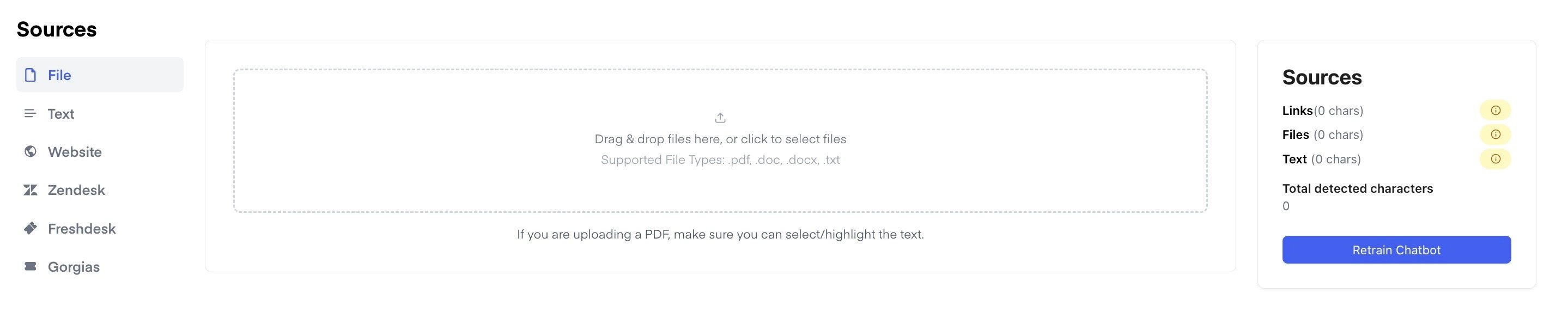 5. **Set the retraining frequency**\
For optimal performance, we recommend setting your retraining frequency to **every 24 hours**, so the chatbot continues learning automatically from your updated data.
5. **Set the retraining frequency**\
For optimal performance, we recommend setting your retraining frequency to **every 24 hours**, so the chatbot continues learning automatically from your updated data.
 6. **Test your bot before go-live**
Manual testing is essential. You can simulate conversations in the dashboard and adjust responses as needed.
6. **Test your bot before go-live**
Manual testing is essential. You can simulate conversations in the dashboard and adjust responses as needed.
 7. **Trigger the AI in your chat flow**
Upon chat start, choose **“AI” as the action** in your flow. This ensures your bot responds based on the instructions, sources, and integrations you configured.
7. **Trigger the AI in your chat flow**
Upon chat start, choose **“AI” as the action** in your flow. This ensures your bot responds based on the instructions, sources, and integrations you configured.
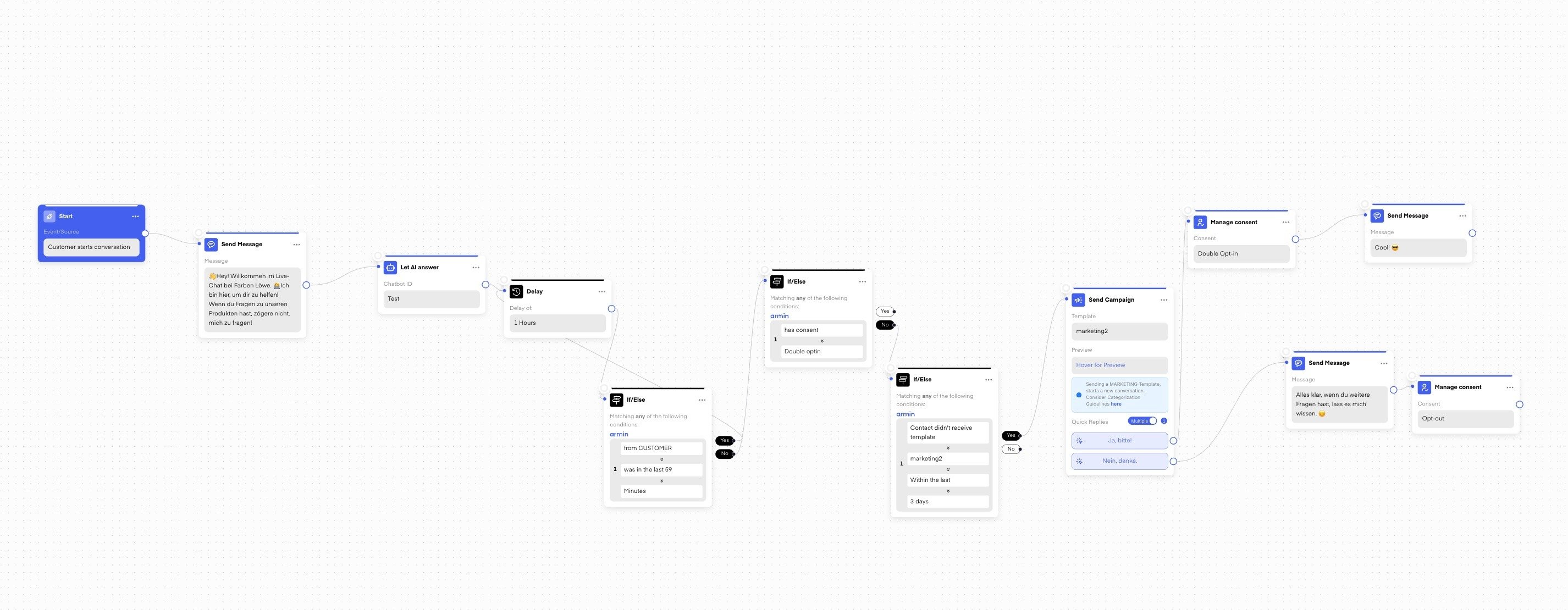 *Example of a client using Chatarmin AI Chatbot for his fully automated client support. Integrating the Chatarmin AI chatbot with zendesk, billbee, and Shopify.*
***
## Retrain your Chatarmin AI Chatbot
***
Whenever you add relevant sub-pages to your website or update your website sitemap, it’s important to **manually retrain your Chatarmin AI chatbot** to ensure it stays accurate and informed.
The same applies if you create new guides, manuals, or prompts - always make sure to **feed this content into the chatbot** and press the **“Retrain”** button.
*Example of a client using Chatarmin AI Chatbot for his fully automated client support. Integrating the Chatarmin AI chatbot with zendesk, billbee, and Shopify.*
***
## Retrain your Chatarmin AI Chatbot
***
Whenever you add relevant sub-pages to your website or update your website sitemap, it’s important to **manually retrain your Chatarmin AI chatbot** to ensure it stays accurate and informed.
The same applies if you create new guides, manuals, or prompts - always make sure to **feed this content into the chatbot** and press the **“Retrain”** button.
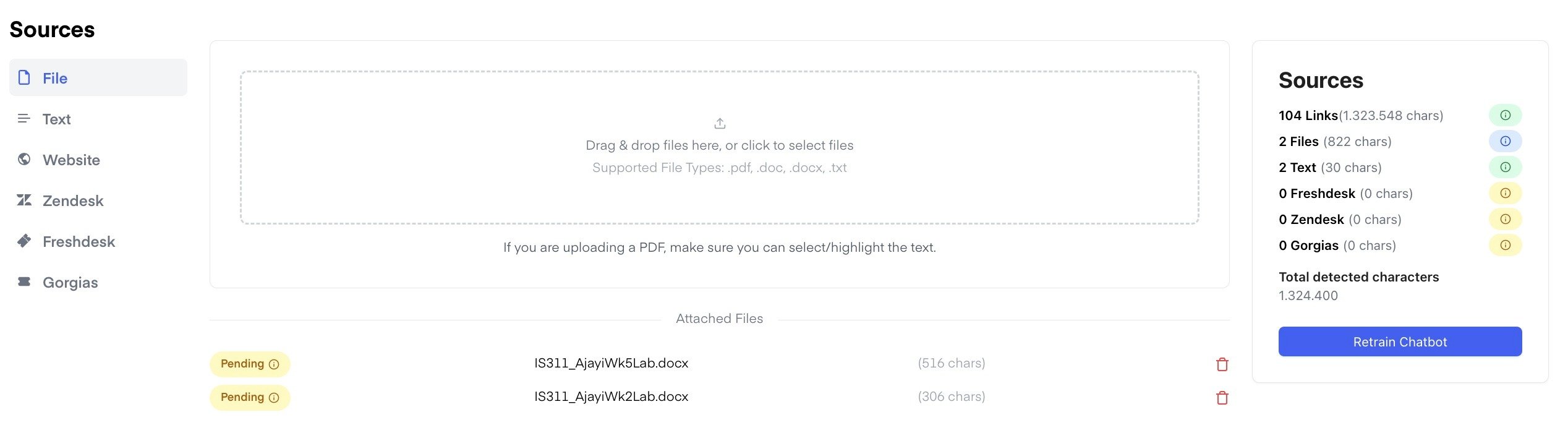 ⚠️ **Important:**\
Make sure to retrain the chatbot **within the correct sub-source page**.\
For example, if you're updating website content, first **navigate to the “Websites” section**, and then press “Retrain Chatbot” there.\
This ensures that the AI is only trained on the content relevant to that source.
Repeat this for all other training sources (e.g., documents, support pages, etc.) - each source must be retrained individually.
***
## Smart Split
***
**Smart** **Split** is a **feature** in our **Chatarmin AI** chatbot designed to **forward** the conversation to your team or guide the user further through a flow. For example, if a customer sends **images, videos,** or any kind of input the bot can't handle, Smart Split can **redirect** the chat **to a human agent.**
⚠️ **Important:**\
Make sure to retrain the chatbot **within the correct sub-source page**.\
For example, if you're updating website content, first **navigate to the “Websites” section**, and then press “Retrain Chatbot” there.\
This ensures that the AI is only trained on the content relevant to that source.
Repeat this for all other training sources (e.g., documents, support pages, etc.) - each source must be retrained individually.
***
## Smart Split
***
**Smart** **Split** is a **feature** in our **Chatarmin AI** chatbot designed to **forward** the conversation to your team or guide the user further through a flow. For example, if a customer sends **images, videos,** or any kind of input the bot can't handle, Smart Split can **redirect** the chat **to a human agent.**
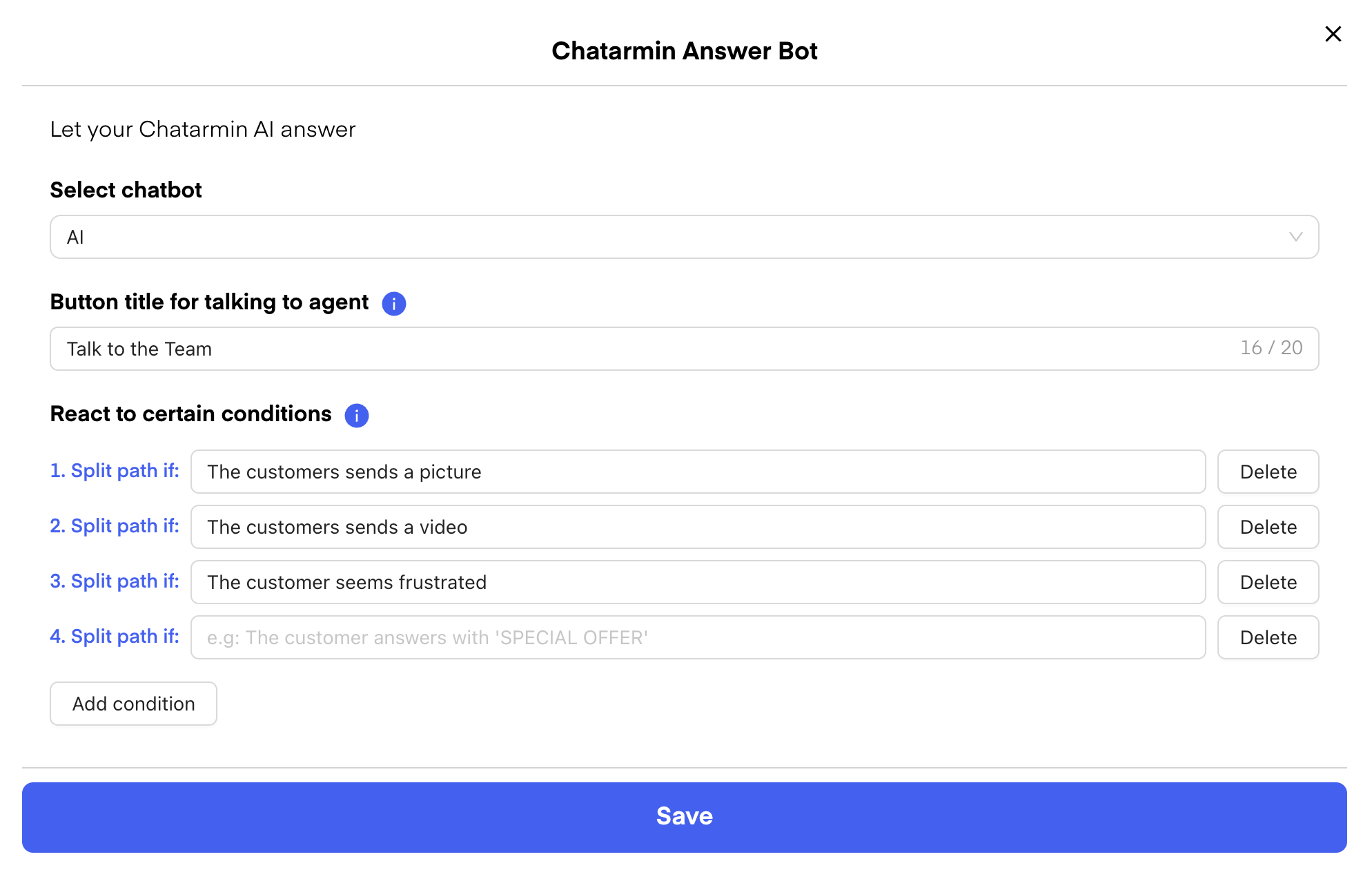 It can also **trigger when** the customer seems **frustrated** or when you prefer **not to handle** certain topics - like **pricing or return requests** - via the chatbot. This ensures a **smooth user experience** and lets your **support team** take over when needed.
 ***
## Improve Answer Manually
***
After conversations are completed, you can review and refine the AI’s responses via the **“Improve Answer”** tab in your AI dashboard.
***
## Improve Answer Manually
***
After conversations are completed, you can review and refine the AI’s responses via the **“Improve Answer”** tab in your AI dashboard.
 *Source: Chatarmin, Q3 2024*
You’ll find your **answer improvement history and documentation** in the [improve answer tab](https://chatarmin.com/dashboard/chatbot/6646a978023a7e5a6555f650?page=Sources\&tab=qa), helping you track all changes over time: [AI-dashboard](https://chatarmin.com/dashboard/chatbot)
*Source: Chatarmin, Q3 2024*
You’ll find your **answer improvement history and documentation** in the [improve answer tab](https://chatarmin.com/dashboard/chatbot/6646a978023a7e5a6555f650?page=Sources\&tab=qa), helping you track all changes over time: [AI-dashboard](https://chatarmin.com/dashboard/chatbot)
 *Source: Chatarmin, Q3 2024*
***
## Chatarmin AI Product Catalog Integration
***
You can integrate your product catalog into Chatarmin AI, allowing your bot to:
* Search products
* Recommend items
* Guide customers through purchases directly via WhatsApp
*Source: Chatarmin, Q3 2024*
Read more about our [WhatsApp catalog feature here](https://help.chatarmin.com/en/features-in-depth/whatsapp-product-catalog).
***
## Integrate Chatarmin AI Chatbot with your Customer Support Tool
***
You do have the chance to enable our Chatarmin AI to integrate with your customer support tool, such as:
* Freshdesk
* Zendesk
* Gorgias
* DIXA
* Intercom
* HubSpot
* and several others
Check out this video, to see how it works:
*Source: Chatarmin, Q3 2024*
***
## Storefinder: Send Location & present nearby stores!
***
If your client is looking for the **nearest store**, you can enable this feature in your AI bot to offer a seamless experience.
Here’s how the **user journey** works:
*Source: Chatarmin, Q3 2024*
1. When a user asks for the **nearest store**, the chatbot prompts them to **share their location**.
2. Based on that input, the AI returns a **list of nearby points of sale** - sorted by proximity.
3. Each result includes:
* **Store name**
* **Opening hours**
* **Phone number**
*Source: Chatarmin, Q3 2024*
***
## Chatarmin AI Product Catalog Integration
***
You can integrate your product catalog into Chatarmin AI, allowing your bot to:
* Search products
* Recommend items
* Guide customers through purchases directly via WhatsApp
*Source: Chatarmin, Q3 2024*
Read more about our [WhatsApp catalog feature here](https://help.chatarmin.com/en/features-in-depth/whatsapp-product-catalog).
***
## Integrate Chatarmin AI Chatbot with your Customer Support Tool
***
You do have the chance to enable our Chatarmin AI to integrate with your customer support tool, such as:
* Freshdesk
* Zendesk
* Gorgias
* DIXA
* Intercom
* HubSpot
* and several others
Check out this video, to see how it works:
*Source: Chatarmin, Q3 2024*
***
## Storefinder: Send Location & present nearby stores!
***
If your client is looking for the **nearest store**, you can enable this feature in your AI bot to offer a seamless experience.
Here’s how the **user journey** works:
*Source: Chatarmin, Q3 2024*
1. When a user asks for the **nearest store**, the chatbot prompts them to **share their location**.
2. Based on that input, the AI returns a **list of nearby points of sale** - sorted by proximity.
3. Each result includes:
* **Store name**
* **Opening hours**
* **Phone number**
 *Source: Chatarmin, Q3 2024*
This way, customers can quickly find the most convenient location and get in touch or visit right away.
Make sure your chatbot responses are clear and actionable, so users can easily move from **search to purchase**!
***
### ***BONUS 1: Watch a full Chatarmin AI-Chatbot-Built from Scratch, by our founder Johannes Mansbart, here:***
***
*Source: Chatarmin, Q3 2024*
***
### ***BONUS 2: Watch a full Chatarmin AI Setup Video by one of our gifted #teamarmin Devs, here:***
***
*Source: Chatarmin, Q2 2024*
***
## Optimal Training Methods for AI Systems
***
## Summary
## Step-by-Step Process
1. **Create Comprehensive Instructions**
* Formulate detailed guidelines and expectations
* Define clear boundaries and desired response formats
2. **Data Collection and Integration**
* Systematically crawl websites
* Upload all relevant manuals
* Integrate customer inquiries and support tickets
* Include document collections with typical queries
3. **System Integration**
* Link with existing ticket management systems
* Implement API connections for real-time data exchange
4. **Continuous Improvement**
* Actively use the "Improve Answer" feature
* Regularly review and evaluate responses
* Pose simulated customer inquiries
* Identify and close knowledge gaps
5. **Documentation and Monitoring**
* Log improvement processes
* Capture performance metrics
* Analyze and aggregate results
Through this iterative process, the AI continuously improves, learns from real interactions, and can provide increasingly precise and useful answers.
***
## Chatarmin AI Demo
***
Here you can test out our **Chatarmin AI**, which is used by our **7–8 figure** clients to automate their WhatsApp sales, customer support, and more.
**MARC O'POLO**\
[https://waurl.me/tvt\_b2ekr](https://waurl.me/ruhya9lxs)
*Source: Chatarmin, Q3 2024*
This way, customers can quickly find the most convenient location and get in touch or visit right away.
Make sure your chatbot responses are clear and actionable, so users can easily move from **search to purchase**!
***
### ***BONUS 1: Watch a full Chatarmin AI-Chatbot-Built from Scratch, by our founder Johannes Mansbart, here:***
***
*Source: Chatarmin, Q3 2024*
***
### ***BONUS 2: Watch a full Chatarmin AI Setup Video by one of our gifted #teamarmin Devs, here:***
***
*Source: Chatarmin, Q2 2024*
***
## Optimal Training Methods for AI Systems
***
## Summary
## Step-by-Step Process
1. **Create Comprehensive Instructions**
* Formulate detailed guidelines and expectations
* Define clear boundaries and desired response formats
2. **Data Collection and Integration**
* Systematically crawl websites
* Upload all relevant manuals
* Integrate customer inquiries and support tickets
* Include document collections with typical queries
3. **System Integration**
* Link with existing ticket management systems
* Implement API connections for real-time data exchange
4. **Continuous Improvement**
* Actively use the "Improve Answer" feature
* Regularly review and evaluate responses
* Pose simulated customer inquiries
* Identify and close knowledge gaps
5. **Documentation and Monitoring**
* Log improvement processes
* Capture performance metrics
* Analyze and aggregate results
Through this iterative process, the AI continuously improves, learns from real interactions, and can provide increasingly precise and useful answers.
***
## Chatarmin AI Demo
***
Here you can test out our **Chatarmin AI**, which is used by our **7–8 figure** clients to automate their WhatsApp sales, customer support, and more.
**MARC O'POLO**\
[https://waurl.me/tvt\_b2ekr](https://waurl.me/ruhya9lxs)
 **PHC Beauty**\
[https://waurl.me/nrf6dbwzx](https://waurl.me/jjkiaiskq)
**PHC Beauty**\
[https://waurl.me/nrf6dbwzx](https://waurl.me/jjkiaiskq)
 **cusbclo**\
[https://waurl.me/pjkq6oqzm](https://waurl.me/pjkq6oqzm)
**cusbclo**\
[https://waurl.me/pjkq6oqzm](https://waurl.me/pjkq6oqzm)